SmartClass Fiber OLP-88 TruePON
Il garantit une activation et un dépannage rapides et précis du service, avec son analyse de données GPON intégrée
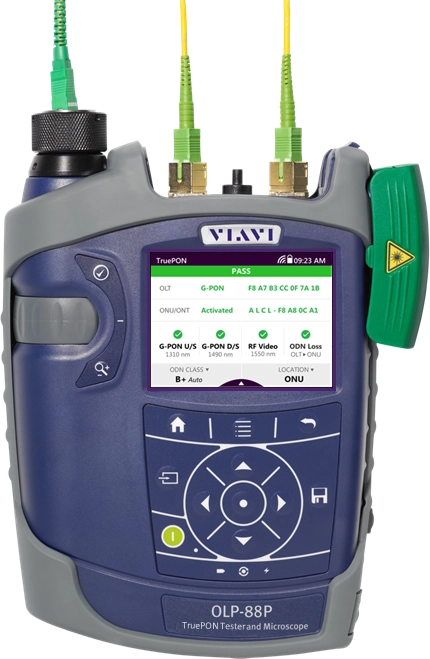
Le testeur OLP-88 TruePON est un instrument de test des réseaux PON unique sur le marché. Il permet d’identifier l’OLT et les ONU, de vérifier le processus d’activation de l’ONT, de certifier automatiquement les niveaux de puissance PON, de faire des tests de perte d'insertion en trafic et de détecter les ONU étrangers/indésirables. Grâce à ses mesures précises du niveau de puissance des signaux PON montant et descendant, l'OLP-88 garantit des tests PON plus fiables et un dépannage plus rapide des problèmes de réseau. L’analyse de données G-PON intégrée simplifie et accélère les processus d'installation, en fournissant automatiquement au technicien l’ensemble des informations nécessaires relatives au système.
Avantages
- Permet de s’assurer que le réseau GPON passe les tests d’acceptation du premier coup
- Réduit le temps de travail du technicien lors de l’activation du service
- Accélère le dépannage sur site et facilite le rétablissement du service
- Permet de limiter les problèmes causés par de mauvaises pratiques lors de la manipulation des fibres optiques.
Applications
- Vérification du processus d’activation GPON ONT
- Identification OLT et ONT (extraction du numéro de série)
- Mesure du niveau de puissance et certification automatiques des signaux PON
- Qualification de l’installation de fibres optiques en service
- Identification des ONU indésirables ou des dispositifs étrangers
- Analyse automatique (réussite/échec) des connecteurs optiques
Caractéristiques
- Écran tactile couleur simple et convivial
- Instrument compact et léger (<1 kg)
- Possibilité de stocker jusqu'à 10 000 résultats de tests
- Interfaces USB, Ethernet et WiFi
- 12 heures d’autonomie de la batterie
- Version avec microscope pour l’inspection des jarretières intégrées et compatibilité avec la sonde d’inspection P5000i (optionnelle)
Téléchargements de logiciels
Brochures
Catalogues
Fiches techniques
Guides de prise en main rapide
Livres blancs
Notes d’application
Téléchargements de logiciels
Care Support Plans
| Product Group | Recommended Plan | Bronze | Silver | Maxcare | |
|---|---|---|---|---|---|
| SmartClass Fiber (OLP-87/OLP-88) (PON Power Meters) | Silver-5 | Does the product require calibration? Common questions or issues |
-
Contrats d’assistance VIAVI
Services BronzeCare SilverCare MaxCare Support Gold Support Fleet Image Image
Image
Image
Image
Assistance technique Premium Premium Premium Premium Premium Réparation en usine Services standards + menu personnalisé :
Calibrage et formation sur site, journées d'ingénieur d'application sur site,
abonnements personnalisés au support ou aux logicielsService prioritaire Formation à votre rythme Calibrage en usine Prêt express * pour les programmes sur 5 ans uniquement
-
VIAVI Care Support for Existing Equipment
FleetCare plans can be customized to include any service entitlements on your fleet of existing equipment. Please fill out a Service Contracts form for a quote.
- Any collection instruments with a single coterminous renewal date
- Each contract is customized with any number of annual terms required by the customer
- Onsite Calibration, Training, Field Application Engineer days can be added


Training Courses
On-Site and Virtual Classroom
Course Number
This course presents a review of the technology fundamentals and proper fiber inspection, cleaning, and handling techniques and a detailed overview for using the product to inspect and clean MPO fibers and connectors and perform power/loss measurements and Loss/Length tests. Learn the recommended techniques for using the product to properly analyze MPO fiber end-faces, including becoming familiar with the GUI and menus and how to prepare it for fiber inspection, power/loss, and Loss/Length tests. Utilize the product to confidently analyze MPO fiber end-faces and test MPO circuits.
- Understand light propagation, network components and architecture, connectors and cable types, fiber losses and attenuation process
- Describe the causes of loss in fiber networks and the types of contamination on fiber end-faces
- Understand the recommended MPO fiber inspection and cleaning techniques and describe the proper process to perform
- Navigate the product GUI and menus to configure for MPO fiber inspection and testing
- Perform proper MPO fiber optic connectivity/continuity tests: inspection and cleaning of all optical connections, optical insertion loss (OIL) and optical return loss (ORL), end-to-end loss testing with optical power meter (OPM) and optical light source (OLS)
- Global
- English
- Other languages available upon request
- On-Site and Virtual Classroom
Course Number
This course presents a detailed overview of the technology fundamentals and proper fiber inspection, cleaning, and handling techniques and for using the product to inspect and clean MPO fibers and connectors and perform power/loss measurements and Loss/Length tests. Learn the recommended techniques for using the product to properly analyze MPO fiber end-faces, including becoming familiar with the GUI and menus and how to prepare it for fiber inspection, power/loss, and Loss/Length tests. Utilize the product to confidently analyze MPO fiber end-faces and test MPO circuits.
- Understand light propagation, network components and architecture, connectors and cable types, fiber losses and attenuation process
- Describe the causes of loss in fiber networks and the types of contamination on fiber end-faces
- Understand the recommended MPO fiber inspection and cleaning techniques and describe the proper process to perform
- Navigate the product GUI and menus to configure for MPO fiber inspection and testing
- Perform proper MPO fiber optic connectivity/continuity tests: inspection and cleaning of all optical connections, optical insertion loss (OIL) and optical return loss (ORL), end-to-end loss testing with optical power meter (OPM) and optical light source (OLS)
- United States
- English
- Other languages available upon request
- On-Site and Virtual Classroom
Self-Paced Online Training
Course Number
This course presents an overview of the SmartClass Fiber MPOLx Product family. Learn how to use the buttons/controls of the MPOLx test set including the front panel and touchscreen display.
- Global
- English
- Other languages available upon request
- Self-Paced Online Training
Course Number
This course presents an overview of the integrated patch cord microscope (PCM) on the SmartClass Fiber MPOLx product. Learn how to quickly inspect the multiple fibers in an MPO connector using the PCM Workflow buttons/controls. (run time ~ 10 minutes)
- Global
- English
- Other languages available upon request
- Self-Paced Online Training
Course Number
This course presents an overview of how to set up and perform a Loss-Length test with the SmartClass Fiber MPOLx test set.
- Global
- English
- Other languages available upon request
- Self-Paced Online Training
Course Number
This course presents an overview of how to operate the SmartClass Ethernet tester. Learn how to navigate the GUI and menus for user and testing preferences, launch and perform tests for layers 1, 2, and 3, and how to locate and manage test results.
- Global
- English
- Other languages available upon request
- Self-Paced Online Training
Course Number
This course presents an overview of the physical layout and features of the SmartClass Fiber HD4i Digital handheld Video Display device used in conjunction with the P5000i Fiber Inspection Microscope Probe. Learn how to use the device buttons, controls, and connectors.
- Global
- English
- Other languages available upon request
- Self-Paced Online Training
Course Number
This course presents an overview of how to locate and configure the various Menu and active test parameters of the SmartClass Fiber HD4i digital handheld Video Display for a fiber inspection test, used in conjunction with the P5000i Fiber Inspection Microscope Probe.
- Global
- English
- Other languages available upon request
- Self-Paced Online Training
Course Number
This course presents an overview of how to perform a Fiber Inspection connector test using the SmartClass Fiber HD4i Video Display device in conjunction with a P5000i Inspection Microscope probe.
- Global
- English
- Other languages available upon request
- Self-Paced Online Training
Course Number
This course presents an Overview of how to use the FiberChekPro software application to configure the SmartClass Fiber HD4i digital handheld Video Display and the P5000i Fiber Inspection Microscope Probe for a fiber inspection (FI) test.
- Global
- English
- Other languages available upon request
- Self-Paced Online Training
Course Number
This course presents an overview of the SmartClass Fiber OLTS-85P product. Learn how to use connector ports and features on the top, rear, and side panels and how to navigate the GUI menus using both touch screen and keypad.
- Global
- English
- Other languages available upon request
- Self-Paced Online Training
Course Number
This course presents an overview of how to do a one-cord test reference with the SmartClass Fiber OLTS-85P test set. Learn how to perform and set a test reference before performing testing operations.
- Global
- English
- Other languages available upon request
- Self-Paced Online Training
Course Number
This course presents an assessment of the knowledge and skills possessed for performing the fiber Inspection, cleaning, and testing techniques using the OLTS-85/85P and P5000i inspection probe in order to achieve the OLTS-85/85P FIT Certification.
- Global
- English
- Other languages available upon request
- Self-Paced Online Training
Course Number
This course presents an overview of how to set up and perform a Loss test using the OLTS-85/85P.
- Global
- English
- Other languages available upon request
- Self-Paced Online Training
Suivi à chaque étape
Nous assurons l’assistance, les services, des formations complètes ainsi que les ressources qu’il vous faut. Tout cela dans le but de maximiser la valeur de vos investissements VIAVI.
Interrogez un expert
Contactez-nous pour de plus amples informations ou pour recevoir un devis. Nos experts sont là pour répondre à toutes vos questions.