SmartClass ファイバー OLP-88 TruePON テスター
統合された GPON データ解析により、迅速かつ正確なサービスアクティベーションとトラブルシューティングを確実に実施
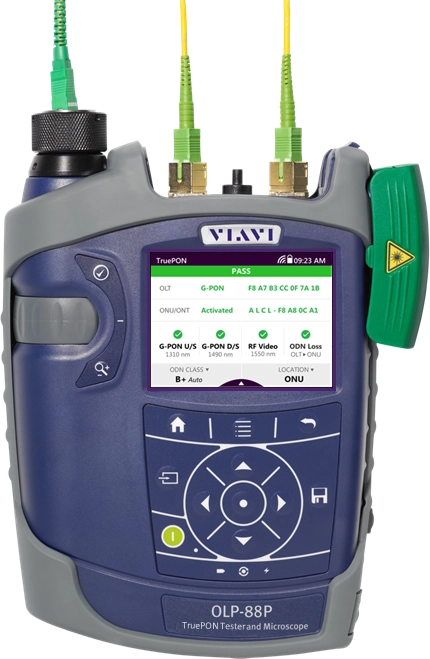
OLP-88 TruePON テスターは、OLT および ONU の識別、ONT アクティベーションプロセスの検証、PON パワーレベルの自動認証、インサービス挿入損失テスト、およびエイリアン/ローグ ONU の検出などのテスト機能を備えた計測器です。OLP-88 は、正確なダウンストリームおよびアップストリームのパワーレベル測定とともに、より信頼性の高い PON テストとネットワーク問題の迅速なトラブルシューティングを確実に行います。ビルトイン G-PON データ解析機能は、システムに関するすべての必要な情報をサービス作業者に自動的に提供することで、導入ワークフローを簡素化し高速化します。
ファイバーテスト、パッシブ光ネットワーク(PON)、および XGS-PON の詳細をご覧ください。
利点
- GPON ネットワークが初回から正しく受け入れられることを保証
- サービスアクティベーション中のワークフローの複雑さを軽減
- オンサイトでのトラブルシューティングを迅速化し、サービス回復を促進
- 不適切な慣行によって引き起こされる問題を取り除くべく、ユーザーのワークフローと作業を導きます。
アプリケーション
- (deleted)
- OLT と ONT の判別(シリアル番号の抽出)
- パッシブ光ネットワーク(PON)信号の自動パワーレベル測定と認証試験
- 稼働中のファイバープラントの適合性
- ローグ ONU やエイリアンデバイスの検出
- 自動合否ファイバー端面解析 -- 端面検査のベストプラクティスの詳細をご覧ください。
主な特徴
- シンプルで使いやすいカラータッチスクリーン
- コンパクトで軽量の計測器(<1kg)
- 最大一万回分のテスト結果を保存するデータストレージ
- USB、イーサネット、WiFi インターフェイス
- 12時間のバッテリー動作
- パッチコードマイクロスコープバージョンと P5000i デジタル検査プローブの互換性
ソフトウェアのダウンロードと更新
ソフトウェアのダウンロードと更新
アプリケーションノート
データシート
ホワイトペーパーおよび書籍
Care Support Plans
| Product Group | Recommended Plan | Bronze | Silver | Maxcare | |
|---|---|---|---|---|---|
| SmartClass Fiber (OLP-87/OLP-88) (PON Power Meters) | Silver-5 | Does the product require calibration? Common questions or issues |
-
VIAVI Care Support for Existing Equipment
FleetCare plans can be customized to include any service entitlements on your fleet of existing equipment. Please fill out a Service Contracts form for a quote.
- Any collection instruments with a single coterminous renewal date
- Each contract is customized with any number of annual terms required by the customer
- Onsite Calibration, Training, Field Application Engineer days can be added


Training Courses
On-Site and Virtual Classroom
Course Number
This course presents a review of the technology fundamentals and proper fiber inspection, cleaning, and handling techniques and a detailed overview for using the product to inspect and clean MPO fibers and connectors and perform power/loss measurements and Loss/Length tests. Learn the recommended techniques for using the product to properly analyze MPO fiber end-faces, including becoming familiar with the GUI and menus and how to prepare it for fiber inspection, power/loss, and Loss/Length tests. Utilize the product to confidently analyze MPO fiber end-faces and test MPO circuits.
- Understand light propagation, network components and architecture, connectors and cable types, fiber losses and attenuation process
- Describe the causes of loss in fiber networks and the types of contamination on fiber end-faces
- Understand the recommended MPO fiber inspection and cleaning techniques and describe the proper process to perform
- Navigate the product GUI and menus to configure for MPO fiber inspection and testing
- Perform proper MPO fiber optic connectivity/continuity tests: inspection and cleaning of all optical connections, optical insertion loss (OIL) and optical return loss (ORL), end-to-end loss testing with optical power meter (OPM) and optical light source (OLS)
- Global
- English
- Other languages available upon request
- On-Site and Virtual Classroom
Course Number
This course presents a detailed overview of the technology fundamentals and proper fiber inspection, cleaning, and handling techniques and for using the product to inspect and clean MPO fibers and connectors and perform power/loss measurements and Loss/Length tests. Learn the recommended techniques for using the product to properly analyze MPO fiber end-faces, including becoming familiar with the GUI and menus and how to prepare it for fiber inspection, power/loss, and Loss/Length tests. Utilize the product to confidently analyze MPO fiber end-faces and test MPO circuits.
- Understand light propagation, network components and architecture, connectors and cable types, fiber losses and attenuation process
- Describe the causes of loss in fiber networks and the types of contamination on fiber end-faces
- Understand the recommended MPO fiber inspection and cleaning techniques and describe the proper process to perform
- Navigate the product GUI and menus to configure for MPO fiber inspection and testing
- Perform proper MPO fiber optic connectivity/continuity tests: inspection and cleaning of all optical connections, optical insertion loss (OIL) and optical return loss (ORL), end-to-end loss testing with optical power meter (OPM) and optical light source (OLS)
- United States
- English
- Other languages available upon request
- On-Site and Virtual Classroom
Self-Paced Online Training
Course Number
This course presents an overview of the SmartClass Fiber MPOLx Product family. Learn how to use the buttons/controls of the MPOLx test set including the front panel and touchscreen display.
- Global
- English
- Other languages available upon request
- Self-Paced Online Training
Course Number
This course presents an overview of the integrated patch cord microscope (PCM) on the SmartClass Fiber MPOLx product. Learn how to quickly inspect the multiple fibers in an MPO connector using the PCM Workflow buttons/controls. (run time ~ 10 minutes)
- Global
- English
- Other languages available upon request
- Self-Paced Online Training
Course Number
This course presents an overview of how to set up and perform a Loss-Length test with the SmartClass Fiber MPOLx test set.
- Global
- English
- Other languages available upon request
- Self-Paced Online Training
Course Number
This course presents an overview of how to operate the SmartClass Ethernet tester. Learn how to navigate the GUI and menus for user and testing preferences, launch and perform tests for layers 1, 2, and 3, and how to locate and manage test results.
- Global
- English
- Other languages available upon request
- Self-Paced Online Training
Course Number
This course presents an overview of the physical layout and features of the SmartClass Fiber HD4i Digital handheld Video Display device used in conjunction with the P5000i Fiber Inspection Microscope Probe. Learn how to use the device buttons, controls, and connectors.
- Global
- English
- Other languages available upon request
- Self-Paced Online Training
Course Number
This course presents an overview of how to locate and configure the various Menu and active test parameters of the SmartClass Fiber HD4i digital handheld Video Display for a fiber inspection test, used in conjunction with the P5000i Fiber Inspection Microscope Probe.
- Global
- English
- Other languages available upon request
- Self-Paced Online Training
Course Number
This course presents an overview of how to perform a Fiber Inspection connector test using the SmartClass Fiber HD4i Video Display device in conjunction with a P5000i Inspection Microscope probe.
- Global
- English
- Other languages available upon request
- Self-Paced Online Training
Course Number
This course presents an Overview of how to use the FiberChekPro software application to configure the SmartClass Fiber HD4i digital handheld Video Display and the P5000i Fiber Inspection Microscope Probe for a fiber inspection (FI) test.
- Global
- English
- Other languages available upon request
- Self-Paced Online Training
Course Number
This course presents an overview of the SmartClass Fiber OLTS-85P product. Learn how to use connector ports and features on the top, rear, and side panels and how to navigate the GUI menus using both touch screen and keypad.
- Global
- English
- Other languages available upon request
- Self-Paced Online Training
Course Number
This course presents an overview of how to do a one-cord test reference with the SmartClass Fiber OLTS-85P test set. Learn how to perform and set a test reference before performing testing operations.
- Global
- English
- Other languages available upon request
- Self-Paced Online Training
Course Number
This course presents an assessment of the knowledge and skills possessed for performing the fiber Inspection, cleaning, and testing techniques using the OLTS-85/85P and P5000i inspection probe in order to achieve the OLTS-85/85P FIT Certification.
- Global
- English
- Other languages available upon request
- Self-Paced Online Training
Course Number
This course presents an overview of how to set up and perform a Loss test using the OLTS-85/85P.
- Global
- English
- Other languages available upon request
- Self-Paced Online Training