SmartClass Fiber OLP-88 TruePON Probador
Garantice una activación del servicio y una solución de problemas rápidas y con gran precisión por medio de un análisis integrado de datos GPON
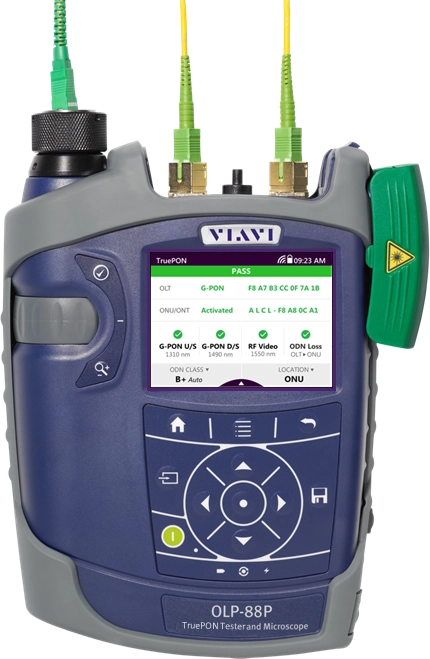
El probador OLP-88 TruePON es el primer instrumento del mercado con funciones para pruebas como la identificación de terminales de línea óptica (OLT) y unidades de red óptica (ONU), la verificación del proceso de activación de terminales de red óptica (ONT), la certificación automática de los niveles de potencia de redes ópticas pasivas (PON), las pruebas de pérdida por inserción en servicio y la detección de ONU desconocidas/no autorizadas. Junto con unas mediciones precisas de los niveles de potencia descendente y ascendente, el modelo OLP-88 garantiza una mayor confiabilidad en las pruebas de las redes PON y una solución más rápida de los problemas de red. El análisis de datos integrado de las redes G-PON simplifica y acelera los flujos de trabajo de instalación al proporcionar automáticamente al técnico de servicio toda la información necesaria sobre el sistema.
Ventajas
- Garantiza la correcta aceptación de la red GPON a la primera.
- Reduce la complejidad del flujo de trabajo durante la activación del servicio.
- Acelera la solución de problemas en las instalaciones y facilita la recuperación del servicio.
- Favorece comportamientos y flujos de trabajo de los usuarios orientados a eliminar problemas provocados por prácticas inadecuadas.
Aplicaciones
- Verificación del proceso de activación de ONT en redes GPON
- Identificación de OLT y ONT (extracción del número de serie)
- Medición y certificación automáticas de los niveles de potencia de las señales de las redes PON
- Calificación de plantas de fibra en servicio
- Identificación de ONU no autorizadas y dispositivos desconocidos
- Análisis automatizados de tipo “pasa/falla” de las terminaciones de fibra (Más información)
Características principales
- Pantalla táctil en color sencilla y fácil de usar
- Instrumento compacto y ligero (<1 kg)
- Almacenamiento integrado de hasta 10 000 resultados de pruebas
- Interfaces USB, Ethernet y WiFi
- 12 horas de duración de la batería
- Compatibilidad con la sonda de inspección digital P5000i y la versión del microscopio con cable de conexión
Descargas y actualizaciones de software
Documentos de referencia rápida
Documentos técnicos y bibliografía
Folletos
Guía de selección
Hojas de especificaciones
Notas de la aplicación
Descargas y actualizaciones de software
Seminario en línea
Care Support Plans
| Product Group | Recommended Plan | Bronze | Silver | Maxcare | |
|---|---|---|---|---|---|
| SmartClass Fiber (OLP-87/OLP-88) (PON Power Meters) | Silver-5 | Does the product require calibration? Common questions or issues |
-
Soporte y asistencia de VIAVI
Servicios BronzeCare SilverCare MaxCare GoldCare FleetCare Imagen Imagen
Imagen
Imagen
Asistencia técnica Premium Premium Premium Premium Premium Reparación en fábrica Servicios estándar + Menú personalizado:
Calibración y formación en las instalaciones, días de servicio de ingeniería de aplicaciones de campo (FAE),
ingeniería personalizada o suscripciones de softwareServicio prioritario Formación autodidacta Calibración de fábrica Equipos de préstamo * Solo planes de cinco años
-
VIAVI Care Support for Existing Equipment
FleetCare plans can be customized to include any service entitlements on your fleet of existing equipment. Please fill out a Service Contracts form for a quote.
- Any collection instruments with a single coterminous renewal date
- Each contract is customized with any number of annual terms required by the customer
- Onsite Calibration, Training, Field Application Engineer days can be added


Training Courses
On-Site and Virtual Classroom
Course Number
This course presents a review of the technology fundamentals and proper fiber inspection, cleaning, and handling techniques and a detailed overview for using the product to inspect and clean MPO fibers and connectors and perform power/loss measurements and Loss/Length tests. Learn the recommended techniques for using the product to properly analyze MPO fiber end-faces, including becoming familiar with the GUI and menus and how to prepare it for fiber inspection, power/loss, and Loss/Length tests. Utilize the product to confidently analyze MPO fiber end-faces and test MPO circuits.
- Understand light propagation, network components and architecture, connectors and cable types, fiber losses and attenuation process
- Describe the causes of loss in fiber networks and the types of contamination on fiber end-faces
- Understand the recommended MPO fiber inspection and cleaning techniques and describe the proper process to perform
- Navigate the product GUI and menus to configure for MPO fiber inspection and testing
- Perform proper MPO fiber optic connectivity/continuity tests: inspection and cleaning of all optical connections, optical insertion loss (OIL) and optical return loss (ORL), end-to-end loss testing with optical power meter (OPM) and optical light source (OLS)
- Global
- English
- Other languages available upon request
- On-Site and Virtual Classroom
Course Number
This course presents a detailed overview of the technology fundamentals and proper fiber inspection, cleaning, and handling techniques and for using the product to inspect and clean MPO fibers and connectors and perform power/loss measurements and Loss/Length tests. Learn the recommended techniques for using the product to properly analyze MPO fiber end-faces, including becoming familiar with the GUI and menus and how to prepare it for fiber inspection, power/loss, and Loss/Length tests. Utilize the product to confidently analyze MPO fiber end-faces and test MPO circuits.
- Understand light propagation, network components and architecture, connectors and cable types, fiber losses and attenuation process
- Describe the causes of loss in fiber networks and the types of contamination on fiber end-faces
- Understand the recommended MPO fiber inspection and cleaning techniques and describe the proper process to perform
- Navigate the product GUI and menus to configure for MPO fiber inspection and testing
- Perform proper MPO fiber optic connectivity/continuity tests: inspection and cleaning of all optical connections, optical insertion loss (OIL) and optical return loss (ORL), end-to-end loss testing with optical power meter (OPM) and optical light source (OLS)
- United States
- English
- Other languages available upon request
- On-Site and Virtual Classroom
Self-Paced Online Training
Course Number
This course presents an overview of the SmartClass Fiber MPOLx Product family. Learn how to use the buttons/controls of the MPOLx test set including the front panel and touchscreen display.
- Global
- English
- Other languages available upon request
- Self-Paced Online Training
Course Number
This course presents an overview of the integrated patch cord microscope (PCM) on the SmartClass Fiber MPOLx product. Learn how to quickly inspect the multiple fibers in an MPO connector using the PCM Workflow buttons/controls. (run time ~ 10 minutes)
- Global
- English
- Other languages available upon request
- Self-Paced Online Training
Course Number
This course presents an overview of how to set up and perform a Loss-Length test with the SmartClass Fiber MPOLx test set.
- Global
- English
- Other languages available upon request
- Self-Paced Online Training
Course Number
This course presents an overview of how to operate the SmartClass Ethernet tester. Learn how to navigate the GUI and menus for user and testing preferences, launch and perform tests for layers 1, 2, and 3, and how to locate and manage test results.
- Global
- English
- Other languages available upon request
- Self-Paced Online Training
Course Number
This course presents an overview of the physical layout and features of the SmartClass Fiber HD4i Digital handheld Video Display device used in conjunction with the P5000i Fiber Inspection Microscope Probe. Learn how to use the device buttons, controls, and connectors.
- Global
- English
- Other languages available upon request
- Self-Paced Online Training
Course Number
This course presents an overview of how to locate and configure the various Menu and active test parameters of the SmartClass Fiber HD4i digital handheld Video Display for a fiber inspection test, used in conjunction with the P5000i Fiber Inspection Microscope Probe.
- Global
- English
- Other languages available upon request
- Self-Paced Online Training
Course Number
This course presents an overview of how to perform a Fiber Inspection connector test using the SmartClass Fiber HD4i Video Display device in conjunction with a P5000i Inspection Microscope probe.
- Global
- English
- Other languages available upon request
- Self-Paced Online Training
Course Number
This course presents an Overview of how to use the FiberChekPro software application to configure the SmartClass Fiber HD4i digital handheld Video Display and the P5000i Fiber Inspection Microscope Probe for a fiber inspection (FI) test.
- Global
- English
- Other languages available upon request
- Self-Paced Online Training
Course Number
This course presents an overview of the SmartClass Fiber OLTS-85P product. Learn how to use connector ports and features on the top, rear, and side panels and how to navigate the GUI menus using both touch screen and keypad.
- Global
- English
- Other languages available upon request
- Self-Paced Online Training
Course Number
This course presents an overview of how to do a one-cord test reference with the SmartClass Fiber OLTS-85P test set. Learn how to perform and set a test reference before performing testing operations.
- Global
- English
- Other languages available upon request
- Self-Paced Online Training
Course Number
This course presents an assessment of the knowledge and skills possessed for performing the fiber Inspection, cleaning, and testing techniques using the OLTS-85/85P and P5000i inspection probe in order to achieve the OLTS-85/85P FIT Certification.
- Global
- English
- Other languages available upon request
- Self-Paced Online Training
Course Number
This course presents an overview of how to set up and perform a Loss test using the OLTS-85/85P.
- Global
- English
- Other languages available upon request
- Self-Paced Online Training
Asistencia en cada paso
Proporcionamos soporte técnico, servicios, una formación completa y los recursos que necesita. Todo ello forma parte de lo que hacemos con el fin de maximizar el valor de su inversión en VIAVI.
Pregunte a un experto
Póngase en contacto con nosotros para obtener más información o recibir un presupuesto. Contamos con expertos que podrán proporcionarle las respuestas adecuadas a cualquier pregunta que le surja.