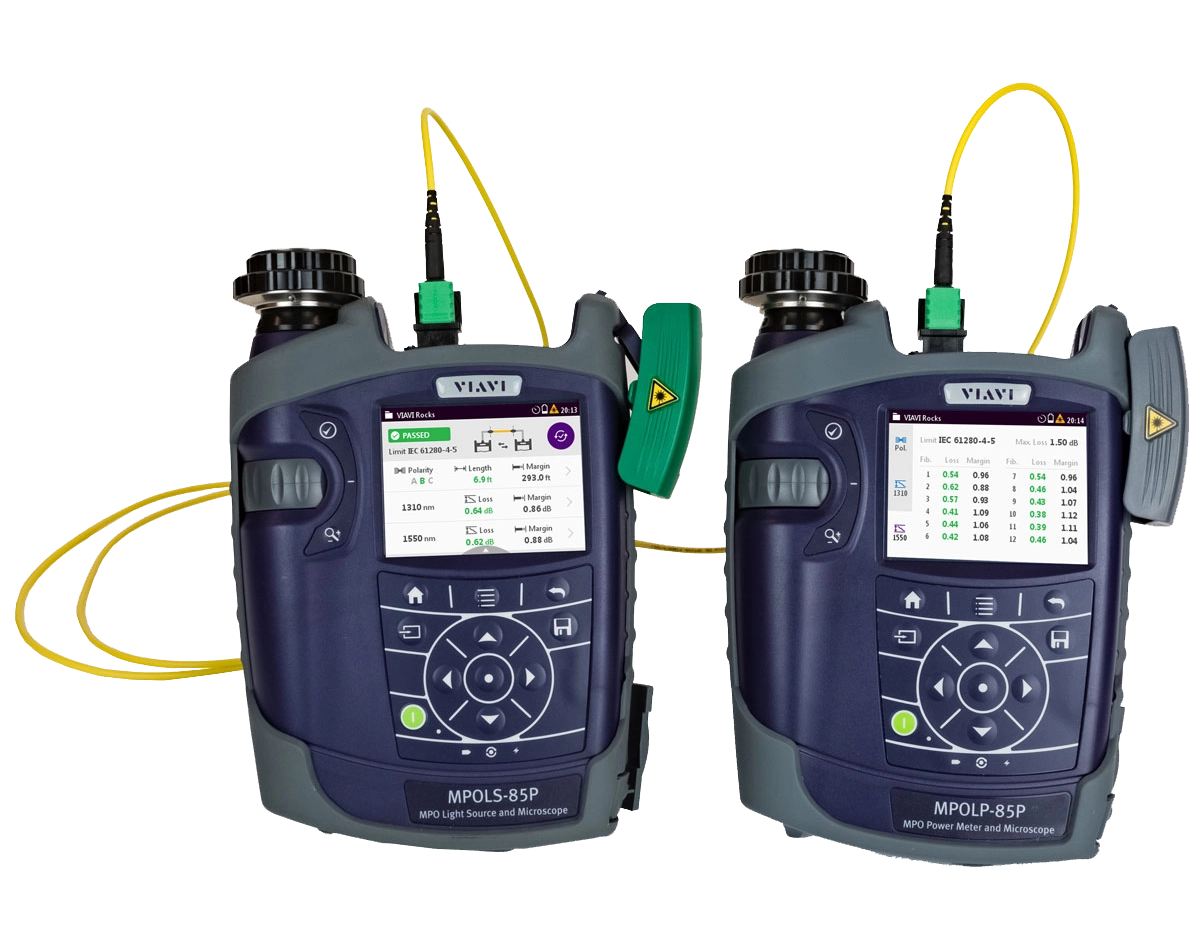
MPOLx 提供了光源和功率计,将基础 MPO 测试功能整合在一起,可在测试和认证采用本机 MPO 连接的的网络链路时确保快速而可靠的工作流程。
借助 MPOLx,现场技术人员可在一个解决方案中执行第 1 层(基础)认证的所有必要测试要求:
- 测量 MPO 长度
- 测量光损耗
- 检查极性
- 检测光纤端面
- 生成认证报告
通过将基础功能与 MPOLx 整合在一起,推动最佳测试实践,并通过优化技术人员的工作流程,帮助技术人员更快地完成工作。
MPOLx 使技术人员能够将 MPO 测试和认证效率提升到一个全新水平。像我们的所有第 1 层(基础)光纤认证解决方案一样,我们提供了同样的本地和远程装置,通过光源和功率计来执行测试,实现全面的分析和控制。所有设备均配备 3.5 英寸彩色触摸屏,并整合了母头和公头连接器检测功能。MPOLx 允许一名技术人员从连接的任一端检测 MPO 端面和执行测试,从而减少了在两台装置之间的来回走动。
MPOLx 只需不到 6 秒的时间便可提供 MPO 连接器全部 12 条光纤的全面测试结果,同时可提供每条 MPO 光纤彩色编码的通过/失败测试结果、测试限制、光纤长度、测试波长、损耗值、裕量以及极性结果,从而可确保快速的工作流程。
优势
- 快速而可靠的测试和认证工作流程
- 可在光源和功率计处实现全面分析和控制
- 在两端均可进行全面的 MPO 端面检测和分析
- 与 FiberChekPRO 集成
主要特性
- 测量长度
- 多波长测量光损耗
- 可检查全部 12 条 MPO 光纤的极性
- 可直接在设备上提供本机 MPO 测试
- 只需 6 秒便可提供全部 12 条 MPO 光纤的<测试结果
- 可同时为中继电缆和母头提供本机 MPO 端面检测和自动化分析
- 双波长光源
- 符合环光通量要求
- 所有 MPOLx 设备均配备 3.5 英寸彩色触摸屏界面
- 生成认证报告
- 电池续航时间长达一整天
特点
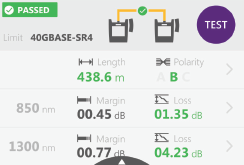
测试结果摘要
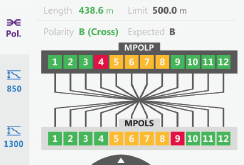
个别结果:极性视图
-
新闻稿-
At MWC Los Angeles, VIAVI Will Showcase Solutions to Deploy and Maintain 5G and IoT Networks at Scale
-
新闻稿-
VIAVI Unveils Hyperscale Data Center Testing Solutions at OFC
-
新闻稿-
VIAVI and Trilithic Join Forces at Cable-Tec Expo
-
新闻稿-
VIAVI Honored by Cabling Installation & Maintenance 2017 Innovators Awards Program
视频
- Essential Concepts to Understand About MPO Connectivity
- Essentials of Multi-Fiber MPO Testing Series - Episode 1: Overview of MPO Connectors
- Essentials of Multi-Fiber MPO Testing Series - Episode 2: Dealing with Contamination on MPO Connector
- Essentials of Multi-Fiber MPO Testing Series - Episode 3: Understanding MPO Connector Polarity
- Essentials of Multi-Fiber MPO Testing Series - Episode 5: MPO Connectivity
- Inspect Before You Connect Video Series
- MPO and Dense Fiber Networks Solutions from VIAVI
- MPOLx - Device Overview
- MPOLx - Inspecting MPO Connectors With The Patch Cord Microscope
- MPOLx: Setting a Reference for Unpinned Systems (Adapter Cord Method)
- MPOLx: Setting a Reference for Unpinned Systems (Gender Neutral Method)
- SmartClass Fiber MPOLx 概述 (cc-简体中文)
Video Gallery
供应商批准
应用指南
快速参考
白皮书和书籍
Care Support Plans
| Product Group | Recommended Plan | Bronze | Silver | Maxcare | |
|---|---|---|---|---|---|
| SmartClass Fiber (OLTS-8x/ MPOLx-8x) | MaxCare-5 | Does the product require calibration? Common questions or issues |
|||
| SmartClass Fiber MPOLx (OLP-82/HD4i) | MaxCare-5 | Does the product require calibration? Common questions or issues |
-
VIAVI Care Support for Existing Equipment
FleetCare plans can be customized to include any service entitlements on your fleet of existing equipment. Please fill out a Service Contracts form for a quote.
- Any collection instruments with a single coterminous renewal date
- Each contract is customized with any number of annual terms required by the customer
- Onsite Calibration, Training, Field Application Engineer days can be added


Training Courses
On-Site and Virtual Classroom
Course Number
This course presents a review of the technology fundamentals and proper fiber inspection, cleaning, and handling techniques and a detailed overview for using the product to inspect and clean MPO fibers and connectors and perform power/loss measurements and Loss/Length tests. Learn the recommended techniques for using the product to properly analyze MPO fiber end-faces, including becoming familiar with the GUI and menus and how to prepare it for fiber inspection, power/loss, and Loss/Length tests. Utilize the product to confidently analyze MPO fiber end-faces and test MPO circuits.
- Understand light propagation, network components and architecture, connectors and cable types, fiber losses and attenuation process
- Describe the causes of loss in fiber networks and the types of contamination on fiber end-faces
- Understand the recommended MPO fiber inspection and cleaning techniques and describe the proper process to perform
- Navigate the product GUI and menus to configure for MPO fiber inspection and testing
- Perform proper MPO fiber optic connectivity/continuity tests: inspection and cleaning of all optical connections, optical insertion loss (OIL) and optical return loss (ORL), end-to-end loss testing with optical power meter (OPM) and optical light source (OLS)
- Global
- English
- Other languages available upon request
- On-Site and Virtual Classroom
Course Number
This course presents a detailed overview of the technology fundamentals and proper fiber inspection, cleaning, and handling techniques and for using the product to inspect and clean MPO fibers and connectors and perform power/loss measurements and Loss/Length tests. Learn the recommended techniques for using the product to properly analyze MPO fiber end-faces, including becoming familiar with the GUI and menus and how to prepare it for fiber inspection, power/loss, and Loss/Length tests. Utilize the product to confidently analyze MPO fiber end-faces and test MPO circuits.
- Understand light propagation, network components and architecture, connectors and cable types, fiber losses and attenuation process
- Describe the causes of loss in fiber networks and the types of contamination on fiber end-faces
- Understand the recommended MPO fiber inspection and cleaning techniques and describe the proper process to perform
- Navigate the product GUI and menus to configure for MPO fiber inspection and testing
- Perform proper MPO fiber optic connectivity/continuity tests: inspection and cleaning of all optical connections, optical insertion loss (OIL) and optical return loss (ORL), end-to-end loss testing with optical power meter (OPM) and optical light source (OLS)
- United States
- English
- Other languages available upon request
- On-Site and Virtual Classroom
Self-Paced Online Training
Course Number
This course presents an overview of the SmartClass Fiber MPOLx Product family. Learn how to use the buttons/controls of the MPOLx test set including the front panel and touchscreen display.
- Global
- English
- Other languages available upon request
- Self-Paced Online Training
Course Number
This course presents an overview of the integrated patch cord microscope (PCM) on the SmartClass Fiber MPOLx product. Learn how to quickly inspect the multiple fibers in an MPO connector using the PCM Workflow buttons/controls. (run time ~ 10 minutes)
- Global
- English
- Other languages available upon request
- Self-Paced Online Training
Course Number
This course presents an overview of how to set up and perform a Loss-Length test with the SmartClass Fiber MPOLx test set.
- Global
- English
- Other languages available upon request
- Self-Paced Online Training
Course Number
This course presents an overview of how to operate the SmartClass Ethernet tester. Learn how to navigate the GUI and menus for user and testing preferences, launch and perform tests for layers 1, 2, and 3, and how to locate and manage test results.
- Global
- English
- Other languages available upon request
- Self-Paced Online Training
Course Number
This course presents an overview of the physical layout and features of the SmartClass Fiber HD4i Digital handheld Video Display device used in conjunction with the P5000i Fiber Inspection Microscope Probe. Learn how to use the device buttons, controls, and connectors.
- Global
- English
- Other languages available upon request
- Self-Paced Online Training
Course Number
This course presents an overview of how to locate and configure the various Menu and active test parameters of the SmartClass Fiber HD4i digital handheld Video Display for a fiber inspection test, used in conjunction with the P5000i Fiber Inspection Microscope Probe.
- Global
- English
- Other languages available upon request
- Self-Paced Online Training
Course Number
This course presents an overview of how to perform a Fiber Inspection connector test using the SmartClass Fiber HD4i Video Display device in conjunction with a P5000i Inspection Microscope probe.
- Global
- English
- Other languages available upon request
- Self-Paced Online Training
Course Number
This course presents an Overview of how to use the FiberChekPro software application to configure the SmartClass Fiber HD4i digital handheld Video Display and the P5000i Fiber Inspection Microscope Probe for a fiber inspection (FI) test.
- Global
- English
- Other languages available upon request
- Self-Paced Online Training
Course Number
This course presents an overview of the SmartClass Fiber OLTS-85P product. Learn how to use connector ports and features on the top, rear, and side panels and how to navigate the GUI menus using both touch screen and keypad.
- Global
- English
- Other languages available upon request
- Self-Paced Online Training
Course Number
This course presents an overview of how to do a one-cord test reference with the SmartClass Fiber OLTS-85P test set. Learn how to perform and set a test reference before performing testing operations.
- Global
- English
- Other languages available upon request
- Self-Paced Online Training
Course Number
This course presents an assessment of the knowledge and skills possessed for performing the fiber Inspection, cleaning, and testing techniques using the OLTS-85/85P and P5000i inspection probe in order to achieve the OLTS-85/85P FIT Certification.
- Global
- English
- Other languages available upon request
- Self-Paced Online Training
Course Number
This course presents an overview of how to set up and perform a Loss test using the OLTS-85/85P.
- Global
- English
- Other languages available upon request
- Self-Paced Online Training