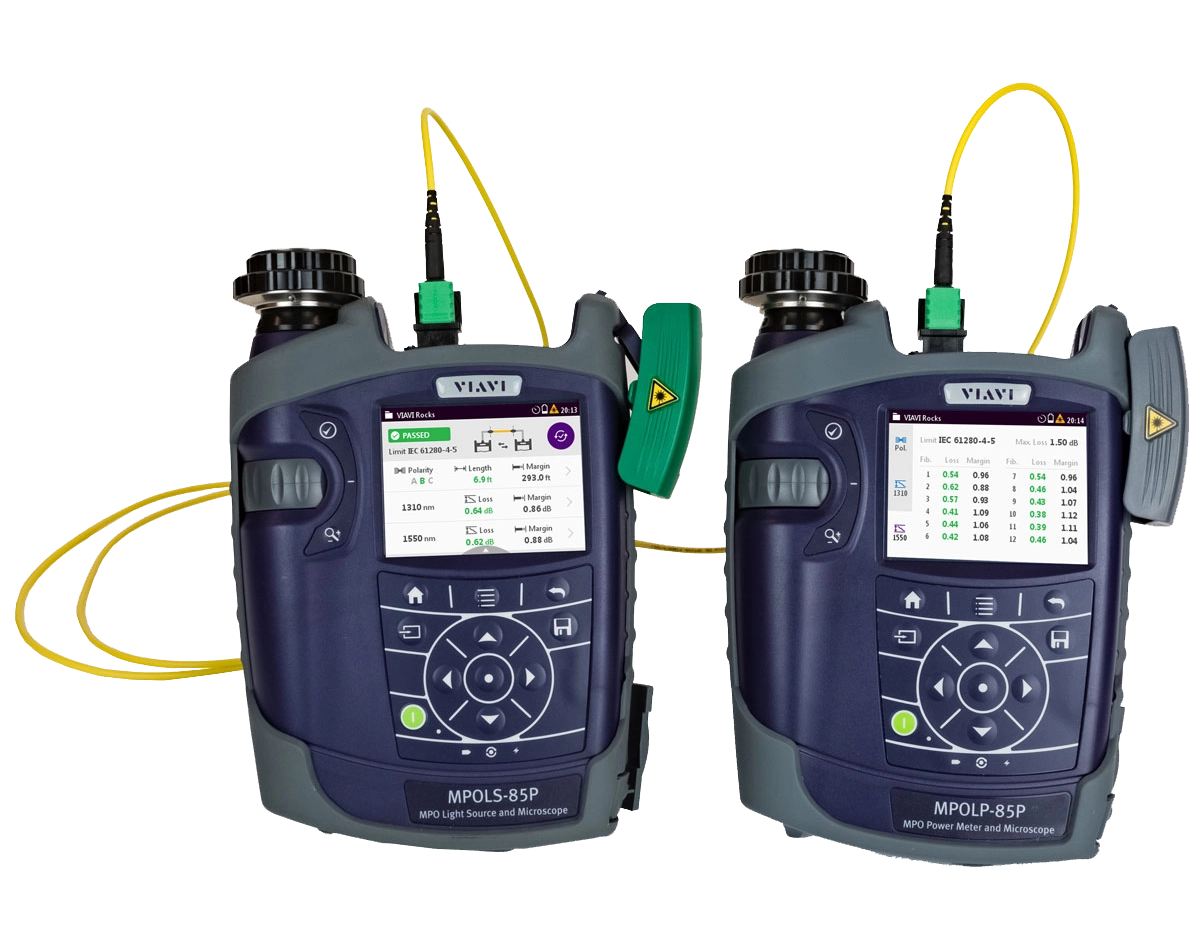
MPOLxは、MPOテスト必須機能を統合した光源とパワーメータであり、MPO接続するネットワークリンクにおいて、高速かつ高信頼性なテストと認証のワークフローを提供します。
MPOLxがあれば、現場技術者はTier 1(基本)認証に必要なテストをすべて実施できます :
- MPOの長さ測定
- 光損失の測定
- 極性のチェック
- ファイバー端面の検査
- 証明報告書の生成
MPOテスト必須機能を統合し、ワークフローを最適することにより作業者のテスト所要時間を短縮します。
特長
MPOLxは、MPOテストと認証において、全く新しいレベルの生産性を実現いたします。当社の他のTier1ソリューション同様に、 ローカルとリモートにそれぞれ装置をセットすれば、光源とパワーメーターのいずれの側からもテストを実行し、その結果を参照することもコントロールすることも可能です。3.5インチカラータッチスクリーンでの操作、および バルクヘッドとトランクコネクター双方の統合検査機能を備えています。MPOLxでは、1人の技術者がMPO端面の検査も接続テストも両端から実施できるため、2台の装置間を行き来する必要がありません。
MPOLxを使用すると、MPOコネクターの全12本のファイバーの包括的なテスト結果が6秒以内で得られ、さらに各MPOファイバーに対して色分けされた合否テスト結果、テスト範囲、ファイバーの長さ、テスト波長、損失値、マージン、極性結果を表示するので、高速なワークフローを実現できます。
利点
- 高速で信頼性の高いテストと認証ワークフロー
- 光源とパワーメーターの両側からのコントロールと結果参照
- 両端での完全なMPO端面検査と解析
- FiberChekPROと連携
主要機能
- 長さの測定
- 複数波長で光損失を測定
- 全12本のMPOファイバーの極性をチェック
- 直接装置上でのネイティブMPOテストを提供
- 全12本のMPOファイバーのテスト結果を6秒以内で取得<
- トランクケーブルとバルクヘッド両方のネイティブMPO端面検査と自動解析を提供
- 2波長光源
- EF(エンサークルドフラックス)準拠
- 3.5インチタッチスクリーンインターフェイス
- 証明報告書の生成
- 一日使える長電池寿命
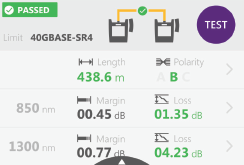
テスト結果の概要
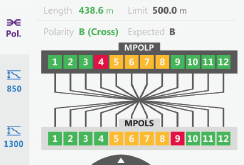
個別結果:極性ビュー
ソフトウェアのダウンロードと更新
-
ニュースリリース-
At MWC Los Angeles, VIAVI Will Showcase Solutions to Deploy and Maintain 5G and IoT Networks at Scale
-
ニュースリリース-
VIAVI Unveils Hyperscale Data Center Testing Solutions at OFC
-
ニュースリリース-
VIAVI and Trilithic Join Forces at Cable-Tec Expo
-
ニュースリリース-
VIAVI Honored by Cabling Installation & Maintenance 2017 Innovators Awards Program
ソフトウェアのダウンロードと更新
ビデオ
- Essential Concepts to Understand About MPO Connectivity
- Essentials of Multi-Fiber MPO Testing Series - Episode 1: Overview of MPO Connectors
- Essentials of Multi-Fiber MPO Testing Series - Episode 2: Dealing with Contamination on MPO Connector
- Essentials of Multi-Fiber MPO Testing Series - Episode 3: Understanding MPO Connector Polarity
- Essentials of Multi-Fiber MPO Testing Series - Episode 5: MPO Connectivity
- Inspect Before You Connect Video Series
- MPO and Dense Fiber Networks Solutions from VIAVI
- MPOLx - Device Overview
- MPOLx - Inspecting MPO Connectors With The Patch Cord Microscope
- MPOLx: Setting a Reference for Unpinned Systems (Adapter Cord Method)
- MPOLx: Setting a Reference for Unpinned Systems (Gender Neutral Method)
- SmartClass Fiber MPOLx Overview
Video Gallery
アプリケーションノート
クイックリファレンス
ケーススタディ
パンフレット
ベンダー認可
ホワイトペーパーおよび書籍
Care Support Plans
| Product Group | Recommended Plan | Bronze | Silver | Maxcare | |
|---|---|---|---|---|---|
| SmartClass Fiber (OLTS-8x/ MPOLx-8x) | MaxCare-5 | Does the product require calibration? Common questions or issues |
|||
| SmartClass Fiber MPOLx (OLP-82/HD4i) | MaxCare-5 | Does the product require calibration? Common questions or issues |
-
VIAVI Care Support for Existing Equipment
FleetCare plans can be customized to include any service entitlements on your fleet of existing equipment. Please fill out a Service Contracts form for a quote.
- Any collection instruments with a single coterminous renewal date
- Each contract is customized with any number of annual terms required by the customer
- Onsite Calibration, Training, Field Application Engineer days can be added


Training Courses
On-Site and Virtual Classroom
Course Number
This course presents a review of the technology fundamentals and proper fiber inspection, cleaning, and handling techniques and a detailed overview for using the product to inspect and clean MPO fibers and connectors and perform power/loss measurements and Loss/Length tests. Learn the recommended techniques for using the product to properly analyze MPO fiber end-faces, including becoming familiar with the GUI and menus and how to prepare it for fiber inspection, power/loss, and Loss/Length tests. Utilize the product to confidently analyze MPO fiber end-faces and test MPO circuits.
- Understand light propagation, network components and architecture, connectors and cable types, fiber losses and attenuation process
- Describe the causes of loss in fiber networks and the types of contamination on fiber end-faces
- Understand the recommended MPO fiber inspection and cleaning techniques and describe the proper process to perform
- Navigate the product GUI and menus to configure for MPO fiber inspection and testing
- Perform proper MPO fiber optic connectivity/continuity tests: inspection and cleaning of all optical connections, optical insertion loss (OIL) and optical return loss (ORL), end-to-end loss testing with optical power meter (OPM) and optical light source (OLS)
- Global
- English
- Other languages available upon request
- On-Site and Virtual Classroom
Course Number
This course presents a detailed overview of the technology fundamentals and proper fiber inspection, cleaning, and handling techniques and for using the product to inspect and clean MPO fibers and connectors and perform power/loss measurements and Loss/Length tests. Learn the recommended techniques for using the product to properly analyze MPO fiber end-faces, including becoming familiar with the GUI and menus and how to prepare it for fiber inspection, power/loss, and Loss/Length tests. Utilize the product to confidently analyze MPO fiber end-faces and test MPO circuits.
- Understand light propagation, network components and architecture, connectors and cable types, fiber losses and attenuation process
- Describe the causes of loss in fiber networks and the types of contamination on fiber end-faces
- Understand the recommended MPO fiber inspection and cleaning techniques and describe the proper process to perform
- Navigate the product GUI and menus to configure for MPO fiber inspection and testing
- Perform proper MPO fiber optic connectivity/continuity tests: inspection and cleaning of all optical connections, optical insertion loss (OIL) and optical return loss (ORL), end-to-end loss testing with optical power meter (OPM) and optical light source (OLS)
- United States
- English
- Other languages available upon request
- On-Site and Virtual Classroom
Self-Paced Online Training
Course Number
This course presents an overview of the SmartClass Fiber MPOLx Product family. Learn how to use the buttons/controls of the MPOLx test set including the front panel and touchscreen display.
- Global
- English
- Other languages available upon request
- Self-Paced Online Training
Course Number
This course presents an overview of the integrated patch cord microscope (PCM) on the SmartClass Fiber MPOLx product. Learn how to quickly inspect the multiple fibers in an MPO connector using the PCM Workflow buttons/controls. (run time ~ 10 minutes)
- Global
- English
- Other languages available upon request
- Self-Paced Online Training
Course Number
This course presents an overview of how to set up and perform a Loss-Length test with the SmartClass Fiber MPOLx test set.
- Global
- English
- Other languages available upon request
- Self-Paced Online Training
Course Number
This course presents an overview of how to operate the SmartClass Ethernet tester. Learn how to navigate the GUI and menus for user and testing preferences, launch and perform tests for layers 1, 2, and 3, and how to locate and manage test results.
- Global
- English
- Other languages available upon request
- Self-Paced Online Training
Course Number
This course presents an overview of the physical layout and features of the SmartClass Fiber HD4i Digital handheld Video Display device used in conjunction with the P5000i Fiber Inspection Microscope Probe. Learn how to use the device buttons, controls, and connectors.
- Global
- English
- Other languages available upon request
- Self-Paced Online Training
Course Number
This course presents an overview of how to locate and configure the various Menu and active test parameters of the SmartClass Fiber HD4i digital handheld Video Display for a fiber inspection test, used in conjunction with the P5000i Fiber Inspection Microscope Probe.
- Global
- English
- Other languages available upon request
- Self-Paced Online Training
Course Number
This course presents an overview of how to perform a Fiber Inspection connector test using the SmartClass Fiber HD4i Video Display device in conjunction with a P5000i Inspection Microscope probe.
- Global
- English
- Other languages available upon request
- Self-Paced Online Training
Course Number
This course presents an Overview of how to use the FiberChekPro software application to configure the SmartClass Fiber HD4i digital handheld Video Display and the P5000i Fiber Inspection Microscope Probe for a fiber inspection (FI) test.
- Global
- English
- Other languages available upon request
- Self-Paced Online Training
Course Number
This course presents an overview of the SmartClass Fiber OLTS-85P product. Learn how to use connector ports and features on the top, rear, and side panels and how to navigate the GUI menus using both touch screen and keypad.
- Global
- English
- Other languages available upon request
- Self-Paced Online Training
Course Number
This course presents an overview of how to do a one-cord test reference with the SmartClass Fiber OLTS-85P test set. Learn how to perform and set a test reference before performing testing operations.
- Global
- English
- Other languages available upon request
- Self-Paced Online Training
Course Number
This course presents an assessment of the knowledge and skills possessed for performing the fiber Inspection, cleaning, and testing techniques using the OLTS-85/85P and P5000i inspection probe in order to achieve the OLTS-85/85P FIT Certification.
- Global
- English
- Other languages available upon request
- Self-Paced Online Training
Course Number
This course presents an overview of how to set up and perform a Loss test using the OLTS-85/85P.
- Global
- English
- Other languages available upon request
- Self-Paced Online Training