SmartClass Fiber OLTS-85/-85P Optical Loss Test Sets
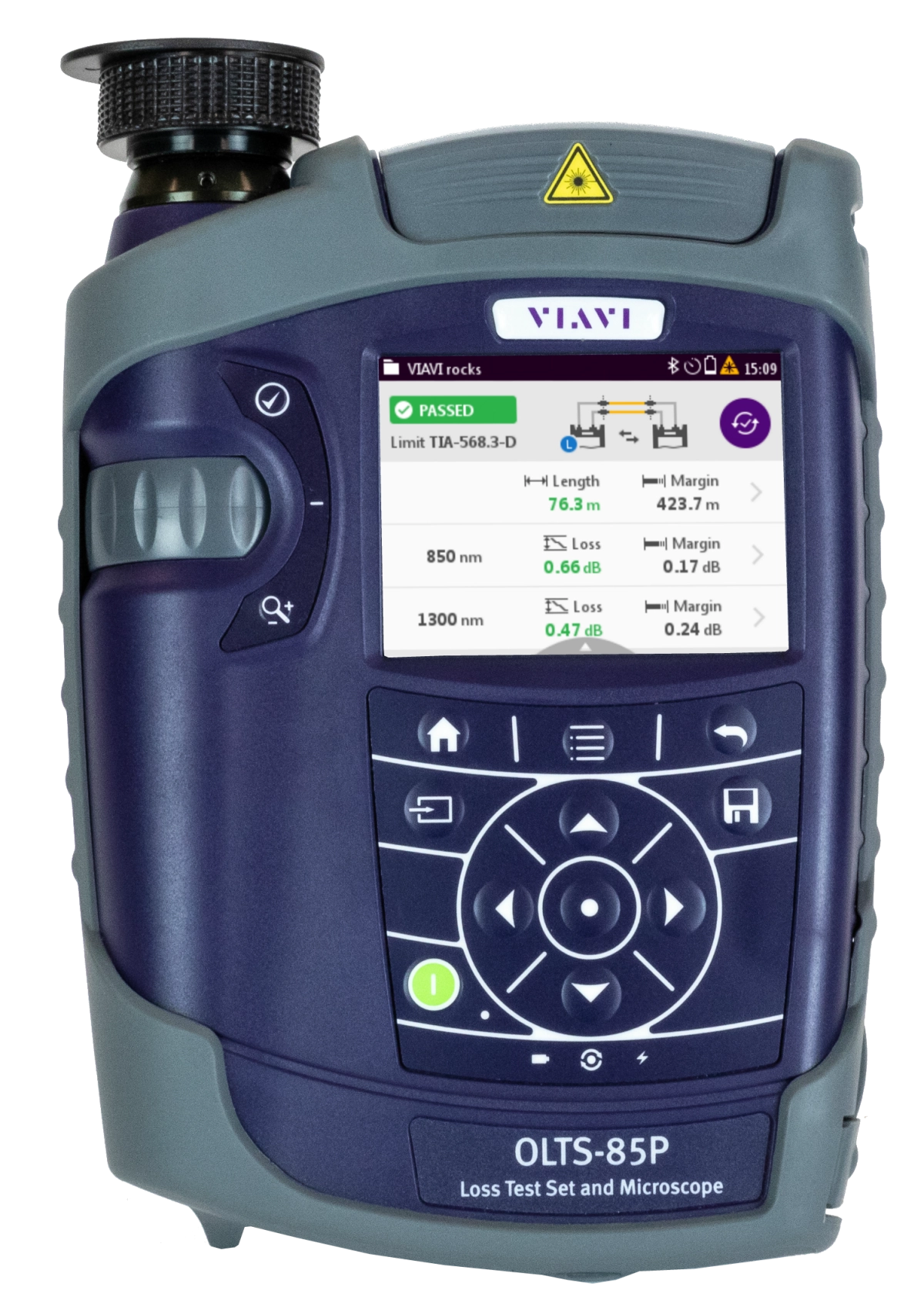
VIAVI Solutions SmartClass Fiber OLTS-85/85P lets installers and technicians work fiber smart by integrating industry-leading fiber inspection with Tier 1 testing. This efficient, easy-to-use solution promotes best practices while cutting testing and certification time in half. Have confidence in your network quality and optimize your workflow with a single solution - the OLTS-85 and 85P.
Key Benefits of the OLTS-85/85P
- Certify installations faster, correctly, and on time—the first time
- Test to industry standards
- Eliminate guesswork with pass/fail results
- Optimize technician efficiency
OLTS-85/85P Applications
- Measuring length and optical loss (two fibers, two wavelengths)
- Ensuring correct polarity
- Inspecting fiber end faces—both patch cord and bulkhead. Learn more
Key Features of the OLTS-85/85P
- Comprehensive tier 1 fiber testing to TIA/ISO/IEC standards
- Dedicated multimode, single-mode, and quad versions
- Fiber end-face inspection with automated pass/fail analysis on both local and remote devices.
- Integrated saving of both local and remote results on the local device
- Encircled flux compliant
- Instant on from sleep mode
- Easily-generated fiber certification reports
- 3.5” color touch screen
- Direct reports via FiberChekPRO™ reporting software
- All-day battery life
What is an OLTS or Optical Loss Test Set?
An Optical Loss Test Set is a hand held field instrument used to perform specific tests for a fiber optic link or channel. These tests include measuring the length and optical loss, and checking the polarity of the installed fiber optic links.
Why should I use an OLTS?
While many use an OLTS for basic troubleshooting tests of optical links and channels, the primary use is during the installation of fiber optic networks to certify the installation according to global industry standards (including TIA 568.3, ISO 11801, and ISO 14763-3). The required test information from these standards include measuring the length, optical loss, and polarity of the installed fiber optic links. Performing these tests are required by the customer and are referred to as “Basic Certification” or “Tier-1 Fiber Certification”. To learn more visit: Tier 1 (Basic) Fiber Optic Certification.
Featured Technical Literature:
Загрузка и обновление программного обеспечения
Ceрвисы
Загрузка и обновление программного обеспечения
Видео
Video Gallery
White Papers и книги
Брошюры
Отзывы клиентов
Приложения к руководствам
Руководства по подбору
Руководства пользователя и инструкции
Спецификации
Care Support Plans
| Product Group | Recommended Plan | Bronze | Silver | Maxcare | |
|---|---|---|---|---|---|
| SmartClass Fiber (OLTS-8x/ MPOLx-8x) | MaxCare-5 | Does the product require calibration? Common questions or issues |
-
Repair and Calibration
Our products live in rugged environments for more than 10 years with 1000s of test connect/disconnect cycles. We will be there to support you to ensure components that require maintenance like connectors, batteries, and software updates are ready to test accurately for years to come. We apply factory procedures fast, automated calibration and functional verification, maintenance using OEM parts, and the application of all engineering change orders and software updates. Services are available through contract Care plans, FleetCare or per incident as requested.
Top 4 Reasons to Choose VIAVI for Your Repair and Calibration Needs:
- Minimize business disruption
- Budget
- Measurement Accuracy and Product Reliability
- Measurement Compliance, TL9000 certification and OEM Standards
-
VIAVI Care Support
Services Bronze Silver MaxCare Изображение Изображение
Technical Assistance Premium Premium Premium Factory Repair Priority Service Self-paced Training Factory Calibration Express Loaner * 5-year plans only; if applicable
-
VIAVI Care Support for Existing Equipment
FleetCare plans can be customized to include any service entitlements on your fleet of existing equipment. Please fill out a Service Contracts form for a quote.
- Any collection instruments with a single coterminous renewal date
- Each contract is customized with any number of annual terms required by the customer
- Onsite Calibration, Training, Field Application Engineer days can be added


Training Courses
On-Site and Virtual Classroom
Course Number
This course presents a review of the technology fundamentals and proper fiber inspection, cleaning, and handling techniques and a detailed overview for using the product to inspect and clean MPO fibers and connectors and perform power/loss measurements and Loss/Length tests. Learn the recommended techniques for using the product to properly analyze MPO fiber end-faces, including becoming familiar with the GUI and menus and how to prepare it for fiber inspection, power/loss, and Loss/Length tests. Utilize the product to confidently analyze MPO fiber end-faces and test MPO circuits.
- Understand light propagation, network components and architecture, connectors and cable types, fiber losses and attenuation process
- Describe the causes of loss in fiber networks and the types of contamination on fiber end-faces
- Understand the recommended MPO fiber inspection and cleaning techniques and describe the proper process to perform
- Navigate the product GUI and menus to configure for MPO fiber inspection and testing
- Perform proper MPO fiber optic connectivity/continuity tests: inspection and cleaning of all optical connections, optical insertion loss (OIL) and optical return loss (ORL), end-to-end loss testing with optical power meter (OPM) and optical light source (OLS)
- Global
- English
- Other languages available upon request
- On-Site and Virtual Classroom
Course Number
This course presents a detailed overview of the technology fundamentals and proper fiber inspection, cleaning, and handling techniques and for using the product to inspect and clean MPO fibers and connectors and perform power/loss measurements and Loss/Length tests. Learn the recommended techniques for using the product to properly analyze MPO fiber end-faces, including becoming familiar with the GUI and menus and how to prepare it for fiber inspection, power/loss, and Loss/Length tests. Utilize the product to confidently analyze MPO fiber end-faces and test MPO circuits.
- Understand light propagation, network components and architecture, connectors and cable types, fiber losses and attenuation process
- Describe the causes of loss in fiber networks and the types of contamination on fiber end-faces
- Understand the recommended MPO fiber inspection and cleaning techniques and describe the proper process to perform
- Navigate the product GUI and menus to configure for MPO fiber inspection and testing
- Perform proper MPO fiber optic connectivity/continuity tests: inspection and cleaning of all optical connections, optical insertion loss (OIL) and optical return loss (ORL), end-to-end loss testing with optical power meter (OPM) and optical light source (OLS)
- United States
- English
- Other languages available upon request
- On-Site and Virtual Classroom
Self-Paced Online Training
Course Number
This course presents an overview of the SmartClass Fiber MPOLx Product family. Learn how to use the buttons/controls of the MPOLx test set including the front panel and touchscreen display.
- Global
- English
- Other languages available upon request
- Self-Paced Online Training
Course Number
This course presents an overview of the integrated patch cord microscope (PCM) on the SmartClass Fiber MPOLx product. Learn how to quickly inspect the multiple fibers in an MPO connector using the PCM Workflow buttons/controls. (run time ~ 10 minutes)
- Global
- English
- Other languages available upon request
- Self-Paced Online Training
Course Number
This course presents an overview of how to set up and perform a Loss-Length test with the SmartClass Fiber MPOLx test set.
- Global
- English
- Other languages available upon request
- Self-Paced Online Training
Course Number
This course presents an overview of how to operate the SmartClass Ethernet tester. Learn how to navigate the GUI and menus for user and testing preferences, launch and perform tests for layers 1, 2, and 3, and how to locate and manage test results.
- Global
- English
- Other languages available upon request
- Self-Paced Online Training
Course Number
This course presents an overview of the physical layout and features of the SmartClass Fiber HD4i Digital handheld Video Display device used in conjunction with the P5000i Fiber Inspection Microscope Probe. Learn how to use the device buttons, controls, and connectors.
- Global
- English
- Other languages available upon request
- Self-Paced Online Training
Course Number
This course presents an overview of how to locate and configure the various Menu and active test parameters of the SmartClass Fiber HD4i digital handheld Video Display for a fiber inspection test, used in conjunction with the P5000i Fiber Inspection Microscope Probe.
- Global
- English
- Other languages available upon request
- Self-Paced Online Training
Course Number
This course presents an overview of how to perform a Fiber Inspection connector test using the SmartClass Fiber HD4i Video Display device in conjunction with a P5000i Inspection Microscope probe.
- Global
- English
- Other languages available upon request
- Self-Paced Online Training
Course Number
This course presents an Overview of how to use the FiberChekPro software application to configure the SmartClass Fiber HD4i digital handheld Video Display and the P5000i Fiber Inspection Microscope Probe for a fiber inspection (FI) test.
- Global
- English
- Other languages available upon request
- Self-Paced Online Training
Course Number
This course presents an overview of the SmartClass Fiber OLTS-85P product. Learn how to use connector ports and features on the top, rear, and side panels and how to navigate the GUI menus using both touch screen and keypad.
- Global
- English
- Other languages available upon request
- Self-Paced Online Training
Course Number
This course presents an overview of how to do a one-cord test reference with the SmartClass Fiber OLTS-85P test set. Learn how to perform and set a test reference before performing testing operations.
- Global
- English
- Other languages available upon request
- Self-Paced Online Training
Course Number
This course presents an assessment of the knowledge and skills possessed for performing the fiber Inspection, cleaning, and testing techniques using the OLTS-85/85P and P5000i inspection probe in order to achieve the OLTS-85/85P FIT Certification.
- Global
- English
- Other languages available upon request
- Self-Paced Online Training
Course Number
This course presents an overview of how to set up and perform a Loss test using the OLTS-85/85P.
- Global
- English
- Other languages available upon request
- Self-Paced Online Training
Поддержка на каждом этапе работы
Мы оказываем техническую поддержку, предоставляем услуги, программы обучения и все необходимые материалы. Наша деятельность направлена на максимальное повышение отдачи от ваших капиталовложений в систему VIAVI.
Спросите у специалиста
Обращайтесь к нам для получения дополнительной информации и ценовых предложений. У нас есть специалисты, готовые дать правильный ответ на любой ваш вопрос.