OneExpert CATV (ONX-620, ONX-630)
OneExpert CATV (ONX-620 or ONX-630) helps field technicians fix problems right—the first time.
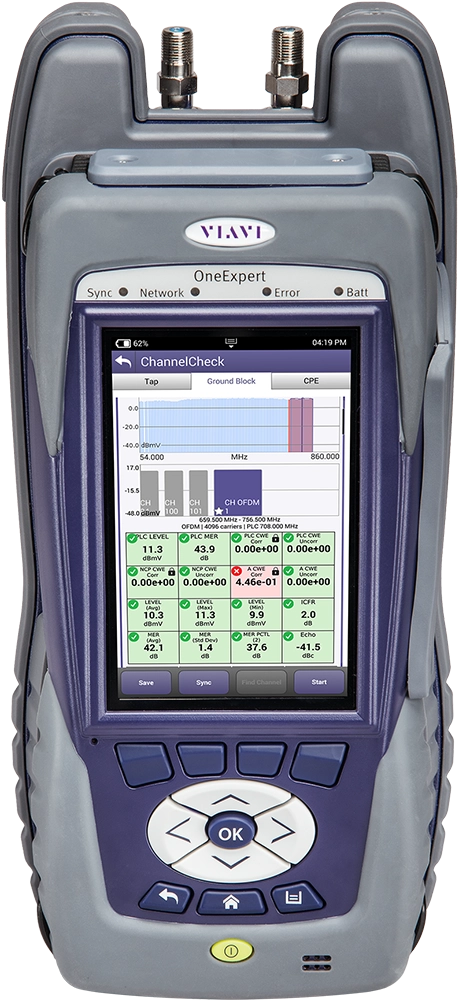
A multi-touch, user-friendly interface and OneCheck™ automated tests ease complex tasks with a simple dashboard with clear pass/fail results. And, its future-proof modularity ensure years of use supporting cable television and home networks.
The OneExpert platform empowers techs for quick, accurate testing and troubleshooting, with models/packages designed to address the specific needs of different work groups. As technology evolves, the future-proof platform adapts easily and capably with thorough state-of-the-art tests. Service providers must be able to adapt, quickly deploy new services and operate at high efficiency in order to maintain the highest levels of reliability and customer satisfaction.
Benefits
Simple – Every technician is an expert
- Channel Plans automatically built by the meter
- Dashboard simplifies and identifies RF issues
- Expertise is built in – Session Expert™ helps technicians identify issues and fix them
- Connects to the cloud – quickly and easily – ensuring consistency via StrataSync™
Fast – Testing and troubleshooting is faster than ever
- Downstream scan including MER/BER in about 60 seconds
- Ingress and Downstream testing performed simultaneously
- 15x more Downstream coverage in half the time of current generation meters
Powerful – Get the most from your investment
- DOCSIS 3.1 physical and service performance testing
- DOCSIS 3.0, 32x8 DOCSIS, Wi-Fi, Ethernet 1Gbps capable
- Add-on module capable to support future needs
- Field exchangeable DOCSIS and RF unit reduces cost of ownership
- Network expansion-ready with dual diplexers to support 42 and 85 or 65 and 85 MHz networks
Applications
- Troubleshoot service issues between the TAP, Ground Block and CPE
- Identify and fix intermittent issues related to QAM carriers and the home network
- Verify WiFi signal strength and availability in 2.4GHz and 5GHz networks
- Business Service turn-up and troubleshooting
- Gigabit service testing with TrueSpeed™
- PON and RFOG installation and troubleshooting including inspection, power levels, and RF performance
Key Features
- DuoPort™ design with PosiScan™ -- a VIAVI Exclusive -- ensures proper connection and testing of Ingress Scan and Downstream tests, helping techs do the job right the first time
- AutoChannel™ - Automatically identifies channel plan
- Cloud Enabled via StrataSync™ to track test results and compliance
- OneCheck dashboard clearly displays summarized results of the entire lineup, including MER/BER in about 60 seconds, with simple identification of faults needing attention
- Expertise Built In – Session Expert -- offers background analysis that identifies issues consistently between technicians, suggests actions that help technicians fix problems, and provides VIAVI expertise and algorithms built into a simple test
- Built in Usage Guide – learn to use the meter on the job
- Advanced capabilities:
- DOCSIS 3.1 physical and service performance
- 32x8 DOCSIS for Gigabit speeds
- WiFi 2.4GHz and 5GHz, wireless personal area network
- Dual GigE Ethernet with optional TrueSpeed™ for testing at ONT or CM
- Optional Fiber Scope and Power Meter
- Forward sweep to 1.2 GHz, reverse sweep to 200 MHz
- Sweep backward compatible with SDA/DSAM gear
Learn more about Signal Leakage.
StrataSync — облачное решение, которое обеспечивает управление ресурсами, настройками и тестовыми данными измерительных приборов VIAVI, а также наличие последнего ПО и опций. StrataSync Core бесплатно поддерживает платформу OneExpert. Расширенные возможности управления данными предлагаются в версии StrataSync Plus.</p>
Part of The VIAVI Remote PHY Solution
This product is part of the comprehensive VIAVI Remote PHY turn-up and maintenance solution enabling seamless transitions from legacy to distributed access architectures.
Загрузка и обновление программного обеспечения
Загрузка и обновление программного обеспечения
Видео
- Broadband Technology Report on OneExpert CATV
- Evolving HFC: DAA, Deeper Fiber, and FTTH Advancements
- Introduction to Home Leakage Testing
- OneExpert CATV with DOCSIS 3.1 and Advanced System Sweep
- OneExpert CATV: Introduction
- OneExpert CATV: ONX-630 Sweep System
- OneExpert CATV: Overview
- Perspective on DOCSIS 3.1
- R-PHY Device Video Verification Testing with the OneExpert CATV
Video Gallery
Вебинары
- Automating Test Workflow to Accelerate Jobs
- Copper/DSL Basics for the OneExpert ONX-580
- Getting Started with the ONX-580
- OneExpert ONX-630 Ingress Expert
- ONX 620: Specialty Features/ Workflow Manager
- ONX 620: System Overview
- ONX 620: Troubleshooting/ Certifying the Home
- ONX 630: System Overview
- ONX 630: Tracking Noise
- ONX 630: Tracking Noise
White Papers и книги
Брошюры
- Cable Subscriber Installation & Test Guide
- Considering R-PHY?
- Fiber Testing with the ONX
- Home Leakage Test Kit: Service Meters and Signal Transmitters
- OneExpert CATV
- OneExpert CATV QAM Video Option
- OneExpert CATV: Enhancements – Full-Scan, Full-Frequency SmartID, Smart Channel Wizard, HomeTDR
- OneExpert CATV: Enhancements – Return Testing, BER, and WiFi Connectivity
- OneExpert CATV: Sweep and Plant Maintenance System ONX-630 / SCU-1800
- WiFi Advisor Coverage Expert
- XPERTrak PNM
Краткие руководства пользователя
Практические кейсы
Приложения к руководствам
Программное обеспечение
Руководства по подбору
Руководства пользователя и инструкции
Care Support Plans
| Product Group | Recommended Plan | Bronze | Silver | Maxcare | |
|---|---|---|---|---|---|
| OneExpert CATV (ONX-220) | Silver-5 | Does the product require calibration? Common questions or issues |
|||
| OneExpert CATV (ONX-6xx) | Silver-5 | Does the product require calibration? Common questions or issues |
-
VIAVI Care Support
Services Bronze Silver MaxCare Изображение Изображение
Technical Assistance Premium Premium Premium Factory Repair Priority Service Self-paced Training Factory Calibration Express Loaner * 5-year plans only; if applicable
-
VIAVI Care Support for Existing Equipment
FleetCare plans can be customized to include any service entitlements on your fleet of existing equipment. Please fill out a Service Contracts form for a quote.
- Any collection instruments with a single coterminous renewal date
- Each contract is customized with any number of annual terms required by the customer
- Onsite Calibration, Training, Field Application Engineer days can be added


Training Courses
Self-Paced Online Training
Course Number
This course presents an overview of the Forward Sweep and Reverse Sweep tests on the ONX-630. Learn how to configure parameters for the test, set a reference, and locate, analyze and send test results to StrataSync.
- Global
- English
- Other languages available upon request
- Self-Paced Online Training
Course Number
This course presents an overview of how to analyze Ingress and Noise results on the ONX-630. Learn about the benefits of real-time analysis compared to scanning analysis.
- Global
- English
- Other languages available upon request
- Self-Paced Online Training
Course Number
This course presents an overview of how to use the ONX CATV Channel Check Application for automated testing operation. Learn how to locate, examine, and analyze various test results.
- Global
- English
- Other languages available upon request
- Self-Paced Online Training
Course Number
This course presents an overview of how to perform the automated Ethernet Speed test with the ONX CATV meter. Learn how to configure and run the test and how to locate and analyze test results.
- Global
- English
- Other languages available upon request
- Self-Paced Online Training
Course Number
This course presents an overview of how to use the ONX CATV OneCheck Application for automated testing operation. Learn how to locate, examine, and analyze various test results.
- Global
- English
- Other languages available upon request
- Self-Paced Online Training
Course Number
This course presents an overview of the ONX CATV Product family. Learn about the key features and capabilities and how to navigate the GUI and menus.
- Global
- English
- Other languages available upon request
- Self-Paced Online Training
Course Number
This course presents an overview of remote control operations using the iOS application with the ONX CATV. Learn how to launch remote control, enable Bluetooth, install the iOS application, and pair an iOS device to the ONX CATV.
- Global
- English
- Other languages available upon request
- Self-Paced Online Training
Course Number
This course presents an overview of how to synchronize the ONX CATV unit to StrataSync. Learn how to connect via wireless radio frequency (RF) or Ethernet connections.
- Global
- English
- Other languages available upon request
- Self-Paced Online Training
Course Number
This course presents an overview of the settings that should be confirmed and adjusted as necessary before running a test with the ONX CATV unit. Learn about key parameters located in the Settings menu and the Tray menu.
- Global
- English
- Other languages available upon request
- Self-Paced Online Training
Course Number
This course presents an overview of the ONX CATV system settings menu. Learn how to configure user preferences and how to use the file browser application.
- Global
- English
- Other languages available upon request
- Self-Paced Online Training
Course Number
This course presents an overview of how to use the ONX CATV test set as a WiFi access point (AP). Learn how to activate the WiFi access point feature and how to set up and prepare the ONX CATV unit for use as a WiFi AP.
- Global
- English
- Other languages available upon request
- Self-Paced Online Training
Поддержка на каждом этапе работы
Мы оказываем техническую поддержку, предоставляем услуги, программы обучения и все необходимые материалы. Наша деятельность направлена на максимальное повышение отдачи от ваших капиталовложений в систему VIAVI.
Спросите у специалиста
Обращайтесь к нам для получения дополнительной информации и ценовых предложений. У нас есть специалисты, готовые дать правильный ответ на любой ваш вопрос.