OneExpert DSL(ONX-580)
G.fast、xDSL、メタル線、FTTx、および WiFi サービス用のモジュール式テストシステム
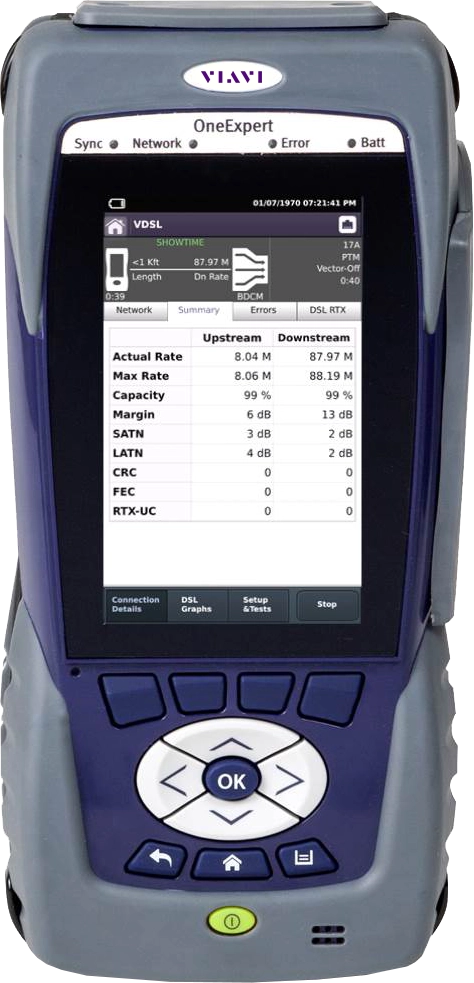
ギガビットブロードバンドの展開を加速 OneExpert DSL(ONX-580 ファミリー)は、フィールド作業者が初回で問題を解決できるようにします。マルチタッチの使いやすいインターフェイスと OneCheck™ により自動化されたテストによって、合否結果を明確に示すことで複雑な作業を簡素化します。また、将来を保証するモジュール方式により、アクセスおよびホームネットワークをサポートして長年にわたる使用を保証します。 モジュール式プラットフォームは、サービスを重視した ONX-580A、メタル線およびサービステストを備えた標準の ONX-580、および高度なメタル線とサービスのテスト用の新しい ONX-580P の 3 つのモデルで、適切な価格帯で局外設備と局内設備の両方のユースケースに適合するように拡張できます。すべてのモデルが FTTH および WiFi テストをサポートできます。
利点
- モジュール式プラットフォームは、VDSL プロファイル 35b と G.fast などの新しい WiFi、ファイバー、xDSL テクノロジーに対応して拡張できます。
- OneCheck はフィールドテストを自動化し、メタル線と DSL の結果を簡素化し、一貫してジョブを正しく終了します
- ワンボタンの OneCheck TDR は障害の種類と場所をすぐに自動識別します
- 標準化された TrueSpeed™ テスト(RFC-6349)で真の顧客体験を立証します
- 3 つの方法(Ookla、SpeedCheck、Broadcom Speedtest)でスループットをテストします
アプリケーション
- G.fast、VDSL(ベクタリングおよびボンディング)、および ADSL ネットワーク
- メタル線、TDR、スペクトラムテスト
- ファイバー、Wi-Fi、同軸、配線のテストと設置
- ウェブ、ビデオ、VoIP、TrueSpeed の検証とトラブルシューティング
主な特徴
- ボンデッドペアおよびベクトルペア、メタル線、POTS、および同軸/ HPNA を含む G.fast および ADSL2+/VDSL2 をテスト
- マルチタッチで使いやすいユーザーインターフェイスは、スマートフォンやタブレットのユーザーエクスペリエンスを活用
- Ookla や TrueSpeed™ など、ボタン 1 つで速度テストを行うための複数のオプション
- StrataSync クラウド対応アーキテクチャにより、資産の管理とテストデータの管理が容易になります
この製品は StrataSync に対応しています
StrataSync は、VIAVI 計測器に対して資産や構成、テストデータの管理を可能にするクラウドベースのホスティングソリューションです。StrataSync を利用することにより、あらゆる計測器のソフトウェアとオプションを確実に最新に保つことができます。
ソフトウェアのダウンロードと更新
ビデオ
Video Gallery
ウェビナー
クイックリファレンス
ソフトウェアおよびファームウェアのリリース
ホワイトペーパーおよび書籍
マニュアルおよびユーザーガイド
Care Support Plans
| Product Group | Recommended Plan | Bronze | Silver | Maxcare | |
|---|---|---|---|---|---|
| OneExpert xDSL (ONX-580) | Silver-5 | Does the product require calibration? Common questions or issues |
-
VIAVI Care Support for Existing Equipment
FleetCare plans can be customized to include any service entitlements on your fleet of existing equipment. Please fill out a Service Contracts form for a quote.
- Any collection instruments with a single coterminous renewal date
- Each contract is customized with any number of annual terms required by the customer
- Onsite Calibration, Training, Field Application Engineer days can be added


Training Courses
Course Number
This course presents a detailed overview of the technology fundamentals including the topology, network problems and fault isolation, and real-world issues that impact quality of service as well as fiber inspection techniques and connectivity/continuity tests. Learn the recommended approach for how to test and evaluate the performance of DWDM networks using OTDR and PMD tests. Understand how to confidently troubleshoot network faults and locate problems in DWDM networks.
- Understand light propagation, DWDM network components and architecture, connectors and cable types, fiber losses and attenuation process, and the recommended fiber inspection and cleaning techniques
- Describe the multiplexing process
- Define PMD and why it needs to be measured
- Understand the operation of an OTDR test and what conditions impact the accuracy of it
- Describe the recommended approach to DWDM and PMD testing and for troubleshooting
- Global
- English
- Other languages available upon request
Course Number
This course presents a detailed overview of technology fundamentals including the topology, protocol-oriented network problems, fault isolation, and real-world issues that impact quality of service. Learn the recommended layered/structured approach for testing and troubleshooting techniques to test and certify Ethernet circuits, including proper fiber inspection techniques.
- Understand the fundamental operation of Ethernet/IP networks including the network components and architecture, connectors and cable types, errors and alarms
- Comprehend the purpose and need for auto-negotiation, Ethernet switching, flow control, and prioritization functions
- Detail the structured approach to test and troubleshoot Ethernet/IP networks including VLANs
- Describe the the characteristics of the TCP/IP protocol suite and how to perform protocol analysis on an IP network
- Become familiar with how to employ the RFC 2544 and Y.1564 automated testing scripts
- Global
- English
- Other languages available upon request
Course Number
This course presents a detailed overview of the basic technology fundamentals including the topology, network problems and fault isolation, and real-world issues that impact quality of service as well as fiber inspection techniques and connectivity/continuity tests. Learn the recommended approach for how to characterize and certify fiber using three key fiber tests, fiber inspection, connectivity/continuity and OTDR for FTTx, FTTP, and FTTA. Understand how to confidently troubleshoot network faults and locate problems in xWDM and PON networks.
- Understand light propagation, network components and architecture, connectors and cable types, fiber losses and attenuation process
- Describe the causes of loss in fiber networks
- Understand the recommended fiber inspection and cleaning techniques and describe the proper process to perform fiber optic connectivity/continuity and OTDR tests
- Global
- English
- Other languages available upon request
Course Number
This course presents a detailed overview of the technology fundamentals and Passive Optical Networks (PONs) including the topology, network problems and fault isolation, and real-world issues that impact quality of service as well as fiber inspection techniques and connectivity/continuity tests. Learn the recommended approach for how to characterize and certify fiber using three key fiber tests, fiber inspection, connectivity/continuity and OTDR for FTTx, FTTP, and FTTA. Understand how to confidently troubleshoot network faults and locate problems in FTTx and PON networks.
- Understand light propagation, network components and architecture, connectors and cable types, fiber losses and attenuation process
- Describe the causes of loss in fiber networks
- Understand the recommended fiber inspection and cleaning techniques
- Describe the proper process to perform fiber optic connectivity/continuity tests
- Understand the fundamental operation of an OTDR test
- Describe what conditions impact the accuracy of the OTDR test
- Detail the steps involved in the process to perform an OTDR test including event analysis
- United States
- English
- Other languages available upon request
Self-Paced Online Training
Course Number
This course presents an overview of performing an OTDR test using the FTTH-SLM mode on the SmartOTDR tester. Learn how to set up an OTDR test for a 1x8 configuration, run the test, and locate, review and save test results.
- Global
- English
- Other languages available upon request
- Self-Paced Online Training
Course Number
This course presents an overview of the recommended Inspect Before You Connect (IBYC) process. Learn how to properly inspect, clean, and test fiber end-faces before making connections.
- Global
- English
- Other languages available upon request
- Self-Paced Online Training
Course Number
This course presents a solid foundation of understanding for Fiber Optic technology and concepts. Learn about fiber safety and standards, light propagation, network components and architecture, connectors and cable types, and fiber losses and attenuation process.
- Global
- English
- Other languages available upon request
- Self-Paced Online Training
Course Number
This course presents a solid foundation of understanding for Fiber Optic testing concepts. Learn about the importance of embracing the proper fiber inspection, cleaning, and basic fiber testing process and techniques, and the basic fiber tests and the tools needed to perform.
- Global
- English
- Other languages available upon request
- Self-Paced Online Training
Course Number
This course presents an overview of the key concepts for performing testing operations in Fiber-to-the-X (FTTX) networks and Passive Optical Networks (PONs). Learn about testing methods for FTTX and PON circuits, and how to test the Optical Signal-to-Noise Ratio (OSNR) in Reconfigurable Optical Add Drop Multiplexer (ROADM) networks.
- Global
- English
- Other languages available upon request
- Self-Paced Online Training
Course Number
This course presents an overview of IP Routing concepts and the operation of Multi Protocol Label Switching networks. Learn about the routing equipment and protocols, and how data flows through the network.
- Global
- English
- Other languages available upon request
- Self-Paced Online Training
Course Number
This course presents an overview of the key concepts for Internet Protocol (IP; ISO Layer 3) technology. Learn about the topology, protocol-oriented network problems and real-world issues that impact quality of service, how to perform testing and isolate faults.
- Global
- English
- Other languages available upon request
- Self-Paced Online Training
Course Number
This course presents an overview of the key concepts for IPTV networks and technology. Learn about IPTV protocols and basic MPEG fundamentals, requirements for proper operation, and IPTV testing methods.
- Global
- English
- Other languages available upon request
- Self-Paced Online Training
Course Number
This course presents an overview of performing an OTDR test using the FTTH-SLM mode on the SmartOTDR tester. Learn how to set up an OTDR test for a 1x8 configuration, run the test, and locate, review and save test results.
- Global
- English
- Other languages available upon request
- Self-Paced Online Training
Course Number
This course presents an overview of the various xDSL technologies and networks. Learn about the xDSL variations and rates, copper line characteristics, network components and topologies, and the testing process.
- Global
- English
- Other languages available upon request
- Self-Paced Online Training
Course Number
This course presents an overview of how to perform Cord Compensation checks with the ONX-580 on the test leads to be used. Learn how to perform the resistance method, opens method, and Resistive Fault Locator (RFL) method.
- Global
- English
- Other languages available upon request
- Self-Paced Online Training
Course Number
This course presents an overview of how to update the firmware/software on the ONX-580 test set. Learn how to perform firmware/software updates via a USB flashdrive or a network connection, and by using StrataSync.
- Global
- English
- Other languages available upon request
- Self-Paced Online Training
Course Number
This course presents an overview of the Multimeter tests on the ONX-580. Learn how to access, launch and create test launch short cuts for frequently used tests, switch between the tests, and how the tests are held in memory.
- Global
- English
- Other languages available upon request
- Self-Paced Online Training
This course presents an overview of the OneCheck TDR test on the ONX-580. Learn about the differences between the OneCheck TDR test and the AutoID TDR test and how to launch and perform the OneCheck TDR test.
- Global
- English
- Other languages available upon request
- Self-Paced Online Training
Course Number
This course presents an overview of the One Expert DSL (ONX-580) platform. Learn how to navigate the front display screen and how to use the buttons/controls, connectors, and test ports.
- Global
- English
- Other languages available upon request
- Self-Paced Online Training
Course Number
This course presents an overview of how to use the P5000i with the ONX-580. Learn how to navigate the ONX-580 GUI and menus to configure the P5000i fiber inspection parameters and how to perform fiber inspection procedures.
- Global
- English
- Other languages available upon request
- Self-Paced Online Training
Course Number
This course presents an overview of the Single Pair Manual Strap RFL test with the ONX-580. Learn how to check the status of and perform the RFL Cord Compensation and how to launch and perform a Single Pair Manual Strap RFL test.
- Global
- English
- Other languages available upon request
- Self-Paced Online Training
Course Number
This course presents an overview of the TDR test application on the ONX-580. Learn how to access and navigate through the TDR test application menus and understand the basic operation of the TDR test application.
- Global
- English
- Other languages available upon request
- Self-Paced Online Training
Course Number
This course presents an overview of the TRUE Copper Qualification test on the ONX-580. Learn how to set up, run, and save the TRUE test results, and how to manage results with the AT&T LSBBT (LightSpeed BroadBand Tools) database.
- Global
- English
- Other languages available upon request
- Self-Paced Online Training
Course Number
This course presents an overview of the RFC 6349 TrueSpeed test with the ONX-580. Learn how to run this test from either a DSL interface or Ethernet interface, and how to view and interpret the RFC 6349 TrueSpeed test results.
- Global
- English
- Other languages available upon request
- Self-Paced Online Training
Course Number
This course presents an overview of how to synchronize the ONX CATV unit to StrataSync. Learn how to connect via wireless radio frequency (RF) or Ethernet connections.
- Global
- English
- Other languages available upon request
- Self-Paced Online Training
Course Number
This course presents an introduction to the Ultra Far-End Device IIB (UltraFED or UFED). Learn how to make it communicate with the ONX-580 and how to navigate the ONX-580 user interface for testing with the UFED IIB.
- Global
- English
- Other languages available upon request
- Self-Paced Online Training