SmartClass Fiber OLP-87 PON Power Meter
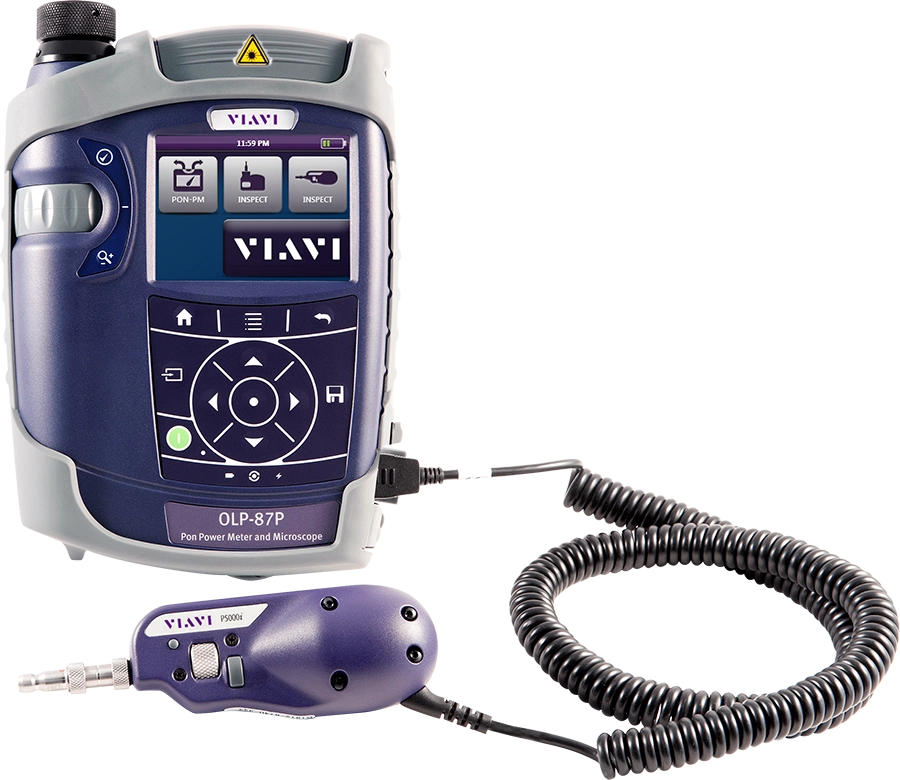
The OLP-87 is an FTTx/PON power meter for use in activating and troubleshooting B-PON, E-PON and G-PON and next generation high speed 10G PON such as XG-PON and 10G-EPON networks, and higher capacity NG-PON2 networks. The OLP-87 combines a high-performance wavelength-selective power meter with pass/fail fiber inspection analysis capability into one portable solution.

Benefits of the VIAVI PON Power Meter:
- Integrates fiber inspection and test for an efficient easy-to-use solution that promotes best practices for handling fiber.
- Easily measures PON power and automatically certifies fiber-end face condition
- Generates certification report that prove that work quality meets industry standard or customer specifications
- Hands-free carrier for easy use inside homes or up on telephone poles
- Future proof, supports co-existence of PON services, e.g. deploying XG(S)-PON and/or NG-PON2 on existing G-PON networks
PON Power Meter Applications:
- Service activation and troubleshooting
- Simultaneous power measurement of all upstream & downstream wavelengths on live PON networks
- Supports tests in B-PON, E-PON, G-PON and XG-PON/10G-EPON networks
- Network activation/testing as part of 5G deployments
Key Features of the OLP-87 PON Power Meter:
- Through-mode capability for simultaneous measurement and display of voice, data and RF video signals on fiber at 1490/1550/1577nm downstream and 1270nm/1310nm upstream for B/E/G/XG(S)/10G
- Individual, wavelength selective, through mode power level measurement for multiple NG-PON2 downstream and upstream channels
- Burst mode measurement for 1270nm, 1310nm and 1535nm upstream signals
- High performance broadband power-meter option
- Up to 10.000 measurement results storage downloadable through USB or Ethernet interfaces
- Automated pass/fail fiber inspection analysis with optional P5000i microscope Integrated patchcord microscope version available
What is a PON Power Meter?
A PON power meter is a dual band or wavelength selective optical power meter designed specifically for use on PON/FTTH networks. These meters are specifically designed for use during the network activation and service installation/activation phases of the network lifecycle. PON power meters have the ability to recognize and measure optical power for individual PON services, specifically measuring the optical power of the downstream wavelengths, for example G-PON or XGS-PON. In addition, PON power meters also support the co-existence of services on the same Passive Optical Network. Co-existence is where multiple services are being delivered over the same network, for example G-PON and XGS-PON or E-PON and 10G-EPON. A PON power meter can isolate each downstream wavelength and provide a clear optical power measurement for each service/wavelength.
Why do you need a PON Power Meter?
Based on market pressures and demand from subscribers, service speeds are increasing. In order to keep up, network operators and service providers are now looking towards higher capacity/speed technologies to help, and are making the move towards deploying the 10G services like XGS-PON and 10G-EPON. Where you have new PON networks it’s reasonable to assume that they will now just jump directly to the 10G services, however, for existing networks where there are already G-PON or E-PON services, running there will have to be a migration. It's not possible to switch off the current services and move to 10G overnight. This would only be possible if you can coordinate a CPE (ONT) switch-out in all customers’ homes overnight, as well as the OLT switch over in the local/central office, and with a guarantee that there will be no hiccups with migrating the service provisioning. Plus, some customers may not want to be upgraded just yet so it's crucial to phase a migration and have both G and XGS-PON services operating on the same PON.
Traditional power meter tools like broadband power meters simply cannot be used in these co-existence scenarios. The reason is because of the way they are designed and the way they operate cannot separate individual service wavelengths. In fact, what they will do is sum together all wavelengths presented to their input (measurement port) and will give an inaccurate (and typically high) power level measurement. This can lead to extra unnecessary optical attenuation being added to reduce power levels to a range acceptable for the CPE (ONT/ONU) devices. Unfortunately, attenuators reduce optical power for all service wavelengths which then results in CPE devices that won’t activate service due to power levels now being too low, or borderline installs where service can suddenly cut out.
If there is only one service present on a PON you might be forgiven for thinking you are in the clear and can go back to using your broadband power meter, or even not bothering with any test or measurement, but how do you know which service is actually present? Is it G-PON or XGS-PON? You need to know as this will determine what type of CPE (ONT/ONU) gets installed. If the wrong CPE is chosen and installed, the device will never activate, and the customer will be without service. A PON power meter is necessary as it will indicate which wavelength/service is present where a broadband power meter will not.
Additional Resources:
Brochures
Data Sheets
Quick References
Selection Guides
Services
Software Download
Video
Webinar
White Papers & Books
- Challenges in Next-Gen PON Deployment
- Fiber in 5G Networks
- Reference Guide to Fiber Optic Testing: Volume 1
- Reference Guide to Fiber Optic Testing: Volume 2
- Test Guide to DAA Planning Deployment & Maintenance
- Testing 5G: Tools and Techniques for Successful Implementation, Maintenance and Monetization
- The Perils of Using a Broadband Power Meter in a Multi-Service PON World
Care Support Plans
| Product Group | Recommended Plan | Bronze | Silver | Maxcare | |
|---|---|---|---|---|---|
| SmartClass Fiber (OLP-87/OLP-88) (PON Power Meters) | Silver-5 | Does the product require calibration? Common questions or issues |
-
VIAVI Care Support
Services Bronze Silver MaxCare Image Image
Image
Technical Assistance Premium Premium Premium Factory Repair Priority Service Self-paced Training Factory Calibration Express Loaner * 5-year plans only; if applicable
-
VIAVI Care Support for Existing Equipment
FleetCare plans can be customized to include any service entitlements on your fleet of existing equipment. Please fill out a Service Contracts form for a quote.
- Any collection instruments with a single coterminous renewal date
- Each contract is customized with any number of annual terms required by the customer
- Onsite Calibration, Training, Field Application Engineer days can be added


Training Courses
On-Site and Virtual Classroom
Course Number
This course presents a review of the technology fundamentals and proper fiber inspection, cleaning, and handling techniques and a detailed overview for using the product to inspect and clean MPO fibers and connectors and perform power/loss measurements and Loss/Length tests. Learn the recommended techniques for using the product to properly analyze MPO fiber end-faces, including becoming familiar with the GUI and menus and how to prepare it for fiber inspection, power/loss, and Loss/Length tests. Utilize the product to confidently analyze MPO fiber end-faces and test MPO circuits.
- Understand light propagation, network components and architecture, connectors and cable types, fiber losses and attenuation process
- Describe the causes of loss in fiber networks and the types of contamination on fiber end-faces
- Understand the recommended MPO fiber inspection and cleaning techniques and describe the proper process to perform
- Navigate the product GUI and menus to configure for MPO fiber inspection and testing
- Perform proper MPO fiber optic connectivity/continuity tests: inspection and cleaning of all optical connections, optical insertion loss (OIL) and optical return loss (ORL), end-to-end loss testing with optical power meter (OPM) and optical light source (OLS)
- Global
- English
- Other languages available upon request
- On-Site and Virtual Classroom
Course Number
This course presents a detailed overview of the technology fundamentals and proper fiber inspection, cleaning, and handling techniques and for using the product to inspect and clean MPO fibers and connectors and perform power/loss measurements and Loss/Length tests. Learn the recommended techniques for using the product to properly analyze MPO fiber end-faces, including becoming familiar with the GUI and menus and how to prepare it for fiber inspection, power/loss, and Loss/Length tests. Utilize the product to confidently analyze MPO fiber end-faces and test MPO circuits.
- Understand light propagation, network components and architecture, connectors and cable types, fiber losses and attenuation process
- Describe the causes of loss in fiber networks and the types of contamination on fiber end-faces
- Understand the recommended MPO fiber inspection and cleaning techniques and describe the proper process to perform
- Navigate the product GUI and menus to configure for MPO fiber inspection and testing
- Perform proper MPO fiber optic connectivity/continuity tests: inspection and cleaning of all optical connections, optical insertion loss (OIL) and optical return loss (ORL), end-to-end loss testing with optical power meter (OPM) and optical light source (OLS)
- United States
- English
- Other languages available upon request
- On-Site and Virtual Classroom
Self-Paced Online Training
Course Number
This course presents an overview of the SmartClass Fiber MPOLx Product family. Learn how to use the buttons/controls of the MPOLx test set including the front panel and touchscreen display.
- Global
- English
- Other languages available upon request
- Self-Paced Online Training
Course Number
This course presents an overview of the integrated patch cord microscope (PCM) on the SmartClass Fiber MPOLx product. Learn how to quickly inspect the multiple fibers in an MPO connector using the PCM Workflow buttons/controls. (run time ~ 10 minutes)
- Global
- English
- Other languages available upon request
- Self-Paced Online Training
Course Number
This course presents an overview of how to set up and perform a Loss-Length test with the SmartClass Fiber MPOLx test set.
- Global
- English
- Other languages available upon request
- Self-Paced Online Training
Course Number
This course presents an overview of how to operate the SmartClass Ethernet tester. Learn how to navigate the GUI and menus for user and testing preferences, launch and perform tests for layers 1, 2, and 3, and how to locate and manage test results.
- Global
- English
- Other languages available upon request
- Self-Paced Online Training
Course Number
This course presents an overview of the physical layout and features of the SmartClass Fiber HD4i Digital handheld Video Display device used in conjunction with the P5000i Fiber Inspection Microscope Probe. Learn how to use the device buttons, controls, and connectors.
- Global
- English
- Other languages available upon request
- Self-Paced Online Training
Course Number
This course presents an overview of how to locate and configure the various Menu and active test parameters of the SmartClass Fiber HD4i digital handheld Video Display for a fiber inspection test, used in conjunction with the P5000i Fiber Inspection Microscope Probe.
- Global
- English
- Other languages available upon request
- Self-Paced Online Training
Course Number
This course presents an overview of how to perform a Fiber Inspection connector test using the SmartClass Fiber HD4i Video Display device in conjunction with a P5000i Inspection Microscope probe.
- Global
- English
- Other languages available upon request
- Self-Paced Online Training
Course Number
This course presents an Overview of how to use the FiberChekPro software application to configure the SmartClass Fiber HD4i digital handheld Video Display and the P5000i Fiber Inspection Microscope Probe for a fiber inspection (FI) test.
- Global
- English
- Other languages available upon request
- Self-Paced Online Training
Course Number
This course presents an overview of the SmartClass Fiber OLTS-85P product. Learn how to use connector ports and features on the top, rear, and side panels and how to navigate the GUI menus using both touch screen and keypad.
- Global
- English
- Other languages available upon request
- Self-Paced Online Training
Course Number
This course presents an overview of how to do a one-cord test reference with the SmartClass Fiber OLTS-85P test set. Learn how to perform and set a test reference before performing testing operations.
- Global
- English
- Other languages available upon request
- Self-Paced Online Training
Course Number
This course presents an assessment of the knowledge and skills possessed for performing the fiber Inspection, cleaning, and testing techniques using the OLTS-85/85P and P5000i inspection probe in order to achieve the OLTS-85/85P FIT Certification.
- Global
- English
- Other languages available upon request
- Self-Paced Online Training
Course Number
This course presents an overview of how to set up and perform a Loss test using the OLTS-85/85P.
- Global
- English
- Other languages available upon request
- Self-Paced Online Training
Support at Every Step
We provide support, services, comprehensive training and the resources you need. It’s all part of what we do to maximize the value of your VIAVI investment.
Ask an Expert
Contact us for more information or to receive a price quote. We have the experts to give you the right answer on any of your questions.