SmartClass Fiber MPOLx - MPO Optical Loss Test Sets
First Dedicated Tier 1 (Basic) MPO Certification Solution
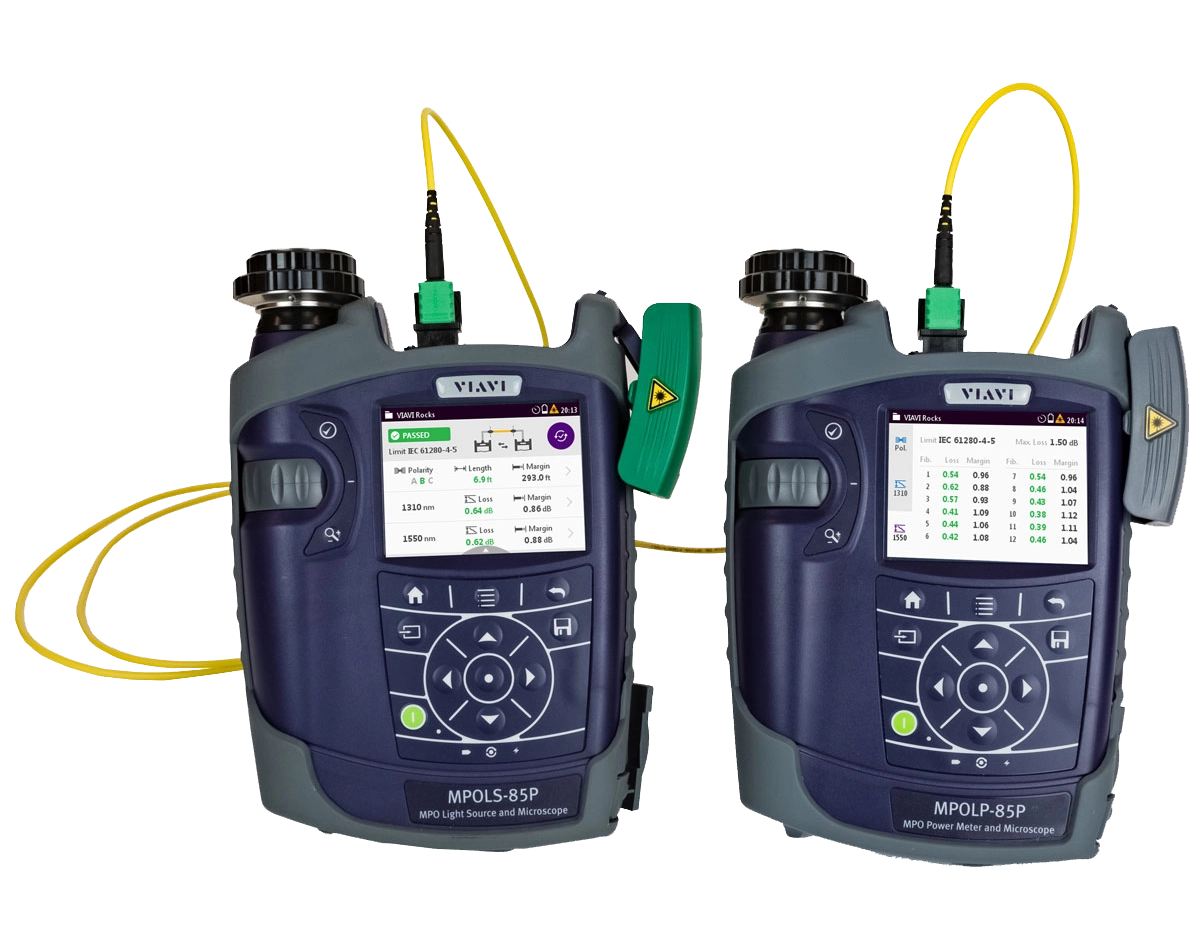
The MPOLx provides a source and power meter that integrate essential test capabilities together to ensure a fast and reliable workflow when testing and certifying network links with native MPO connectivity.
With the MPOLx, field technicians can perform all the necessary test requirements for Tier 1 (Basic) certification in a single solution:
- Measure MPO length
- Measure optical loss
- Check polarity
- Inspect fiber end faces
- Generate certification reports
Drive best test practices by integrating essential functions together with the MPOLx and help technicians finish jobs faster by optimizing their workflow.
Highlights
The MPOLx gives technicians the ability to achieve a completely new level of productivity for testing and certification. Like all our solutions for Tier 1 (Basic) fiber certification, identical local and remote units are provided to enable full visibility and control by performing tests from both the Light Source and Power Meter. All devices feature a 3.5" color touch screen and integrated inspection for both bulkhead and trunk connectors. The MPOLx allows a single technician to inspect MPO end faces and perform tests from either end of the connection, reducing walking back and forth between the two units.
The MPOLx ensures fast workflows by delivering comprehensive test results in less than 6 seconds for all 12 fibers of the connector providing color coded pass/fail test results, test limit, fiber length, test wavelengths, loss values, margins, and polarity results for each fiber.
Benefits
- Fast and reliable test and certification workflow
- Full visibility and control at both the source and power meter
- Complete multi-fiber push on end face inspection and analysis at both ends. Learn more
- Integrates with FiberChekPRO

Test Results Summary

Individual Results: Polarity View
Key Features
- Measures length
- Measures optical loss at multiple wavelengths
- Checks polarity for all 12 MPO fibers
- Provides native MPO testing directly on devices
- Delivers test results for all 12 MPO fibers in <6 seconds
- Provides native MPO end-face inspection and automated analysis for both trunk cables and bulkheads
- Dual wavelength optical light sources
- Encircled flux compliant
- 3.5" color touch screen interface on all MPOLx devices
- Generate certification reports
- All-day battery life
Find additional resources by visiting:
Software Download
-
News Release-
At MWC Los Angeles, VIAVI Will Showcase Solutions to Deploy and Maintain 5G and IoT Networks at Scale
-
News Release-
VIAVI Unveils Hyperscale Data Center Testing Solutions at OFC
-
News Release-
VIAVI and Trilithic Join Forces at Cable-Tec Expo
-
News Release-
VIAVI Honored by Cabling Installation & Maintenance 2017 Innovators Awards Program
Application Notes
Brochures
Case Studies
Quick References
Selection Guides
Services
Software Download
Vendor Approvals
Video
- Essential Concepts to Understand About MPO Connectivity
- Essentials of Multi-Fiber MPO Testing Series - Episode 1: Overview of MPO Connectors
- Essentials of Multi-Fiber MPO Testing Series - Episode 2: Dealing with Contamination on MPO Connector
- Essentials of Multi-Fiber MPO Testing Series - Episode 3: Understanding MPO Connector Polarity
- Essentials of Multi-Fiber MPO Testing Series - Episode 5: MPO Connectivity
- Inspect Before You Connect Video Series
- MPO and Dense Fiber Networks Solutions from VIAVI
- MPOLx - Device Overview
- MPOLx - Inspecting MPO Connectors With The Patch Cord Microscope
- MPOLx: Setting a Reference for Unpinned Systems (Adapter Cord Method)
- MPOLx: Setting a Reference for Unpinned Systems (Gender Neutral Method)
- SmartClass Fiber MPOLx Overview
Video Gallery
Care Support Plans
| Product Group | Recommended Plan | Bronze | Silver | Maxcare | |
|---|---|---|---|---|---|
| SmartClass Fiber (OLTS-8x/ MPOLx-8x) | MaxCare-5 | Does the product require calibration? Common questions or issues |
|||
| SmartClass Fiber MPOLx (OLP-82/HD4i) | MaxCare-5 | Does the product require calibration? Common questions or issues |
-
VIAVI Care Support
Services Bronze Silver MaxCare Image Image
Image
Technical Assistance Premium Premium Premium Factory Repair Priority Service Self-paced Training Factory Calibration Express Loaner * 5-year plans only; if applicable
-
VIAVI Care Support for Existing Equipment
FleetCare plans can be customized to include any service entitlements on your fleet of existing equipment. Please fill out a Service Contracts form for a quote.
- Any collection instruments with a single coterminous renewal date
- Each contract is customized with any number of annual terms required by the customer
- Onsite Calibration, Training, Field Application Engineer days can be added


Training Courses
On-Site and Virtual Classroom
Course Number
This course presents a review of the technology fundamentals and proper fiber inspection, cleaning, and handling techniques and a detailed overview for using the product to inspect and clean MPO fibers and connectors and perform power/loss measurements and Loss/Length tests. Learn the recommended techniques for using the product to properly analyze MPO fiber end-faces, including becoming familiar with the GUI and menus and how to prepare it for fiber inspection, power/loss, and Loss/Length tests. Utilize the product to confidently analyze MPO fiber end-faces and test MPO circuits.
- Understand light propagation, network components and architecture, connectors and cable types, fiber losses and attenuation process
- Describe the causes of loss in fiber networks and the types of contamination on fiber end-faces
- Understand the recommended MPO fiber inspection and cleaning techniques and describe the proper process to perform
- Navigate the product GUI and menus to configure for MPO fiber inspection and testing
- Perform proper MPO fiber optic connectivity/continuity tests: inspection and cleaning of all optical connections, optical insertion loss (OIL) and optical return loss (ORL), end-to-end loss testing with optical power meter (OPM) and optical light source (OLS)
- Global
- English
- Other languages available upon request
- On-Site and Virtual Classroom
Course Number
This course presents a detailed overview of the technology fundamentals and proper fiber inspection, cleaning, and handling techniques and for using the product to inspect and clean MPO fibers and connectors and perform power/loss measurements and Loss/Length tests. Learn the recommended techniques for using the product to properly analyze MPO fiber end-faces, including becoming familiar with the GUI and menus and how to prepare it for fiber inspection, power/loss, and Loss/Length tests. Utilize the product to confidently analyze MPO fiber end-faces and test MPO circuits.
- Understand light propagation, network components and architecture, connectors and cable types, fiber losses and attenuation process
- Describe the causes of loss in fiber networks and the types of contamination on fiber end-faces
- Understand the recommended MPO fiber inspection and cleaning techniques and describe the proper process to perform
- Navigate the product GUI and menus to configure for MPO fiber inspection and testing
- Perform proper MPO fiber optic connectivity/continuity tests: inspection and cleaning of all optical connections, optical insertion loss (OIL) and optical return loss (ORL), end-to-end loss testing with optical power meter (OPM) and optical light source (OLS)
- United States
- English
- Other languages available upon request
- On-Site and Virtual Classroom
Self-Paced Online Training
Course Number
This course presents an overview of the SmartClass Fiber MPOLx Product family. Learn how to use the buttons/controls of the MPOLx test set including the front panel and touchscreen display.
- Global
- English
- Other languages available upon request
- Self-Paced Online Training
Course Number
This course presents an overview of the integrated patch cord microscope (PCM) on the SmartClass Fiber MPOLx product. Learn how to quickly inspect the multiple fibers in an MPO connector using the PCM Workflow buttons/controls. (run time ~ 10 minutes)
- Global
- English
- Other languages available upon request
- Self-Paced Online Training
Course Number
This course presents an overview of how to set up and perform a Loss-Length test with the SmartClass Fiber MPOLx test set.
- Global
- English
- Other languages available upon request
- Self-Paced Online Training
Course Number
This course presents an overview of how to operate the SmartClass Ethernet tester. Learn how to navigate the GUI and menus for user and testing preferences, launch and perform tests for layers 1, 2, and 3, and how to locate and manage test results.
- Global
- English
- Other languages available upon request
- Self-Paced Online Training
Course Number
This course presents an overview of the physical layout and features of the SmartClass Fiber HD4i Digital handheld Video Display device used in conjunction with the P5000i Fiber Inspection Microscope Probe. Learn how to use the device buttons, controls, and connectors.
- Global
- English
- Other languages available upon request
- Self-Paced Online Training
Course Number
This course presents an overview of how to locate and configure the various Menu and active test parameters of the SmartClass Fiber HD4i digital handheld Video Display for a fiber inspection test, used in conjunction with the P5000i Fiber Inspection Microscope Probe.
- Global
- English
- Other languages available upon request
- Self-Paced Online Training
Course Number
This course presents an overview of how to perform a Fiber Inspection connector test using the SmartClass Fiber HD4i Video Display device in conjunction with a P5000i Inspection Microscope probe.
- Global
- English
- Other languages available upon request
- Self-Paced Online Training
Course Number
This course presents an Overview of how to use the FiberChekPro software application to configure the SmartClass Fiber HD4i digital handheld Video Display and the P5000i Fiber Inspection Microscope Probe for a fiber inspection (FI) test.
- Global
- English
- Other languages available upon request
- Self-Paced Online Training
Course Number
This course presents an overview of the SmartClass Fiber OLTS-85P product. Learn how to use connector ports and features on the top, rear, and side panels and how to navigate the GUI menus using both touch screen and keypad.
- Global
- English
- Other languages available upon request
- Self-Paced Online Training
Course Number
This course presents an overview of how to do a one-cord test reference with the SmartClass Fiber OLTS-85P test set. Learn how to perform and set a test reference before performing testing operations.
- Global
- English
- Other languages available upon request
- Self-Paced Online Training
Course Number
This course presents an assessment of the knowledge and skills possessed for performing the fiber Inspection, cleaning, and testing techniques using the OLTS-85/85P and P5000i inspection probe in order to achieve the OLTS-85/85P FIT Certification.
- Global
- English
- Other languages available upon request
- Self-Paced Online Training
Course Number
This course presents an overview of how to set up and perform a Loss test using the OLTS-85/85P.
- Global
- English
- Other languages available upon request
- Self-Paced Online Training
Support at Every Step
We provide support, services, comprehensive training and the resources you need. It’s all part of what we do to maximize the value of your VIAVI investment.
Ask an Expert
Contact us for more information or to receive a price quote. We have the experts to give you the right answer on any of your questions.